> ## Documentation Index
> Fetch the complete documentation index at: https://docs.germainux.com/llms.txt
> Use this file to discover all available pages before exploring further.
# Vercel (AI Chat)
> GermainUX monitors Vercel activity within a web application and correlates customer, agent, and bot conversations with the surrounding digital experience.
export const GxFooter = () => The content of this document is proprietary to GERMAIN SOFTWARE LLC.
;
export const GxStyle = () => ;
Availability
2021.1 or later
Components used for capture
Monitor live Vercel activity
Vercel Web API setup
Only authorized browser context data
## Overview
GermainUX monitors Vercel activity within a web application and correlates customer, agent, and bot conversations with the surrounding digital experience.
This helps organizations understand whether communication quality, agent availability, bot behavior, application performance, or another customer-journey issue affected service, engagement, or conversion.
## Monitoring components
| Component | Role |
| - | - |
| [GermainUX RUM JS](/main/germain-ux-rum-js) | Captures supported Vercel events, messages, user interactions, browser performance, and session context when the monitoring script can be deployed in the application. |
| [GermainUX RUM Extension](/main/germain-ux-rum-extension) | Provides browser monitoring when RUM JS cannot be deployed directly or access to the complete browser-page context requires an extension. |
| [GermainUX JS Profiler](/main/germain-ux-js-profiler) | Provides deeper JavaScript, browser, network, and resource-loading evidence when a Vercel issue requires technical investigation. |
## Capabilities
GermainUX can collect and analyze:
* Supported Vercel events.
* Messages exchanged between customers, agents, and bots.
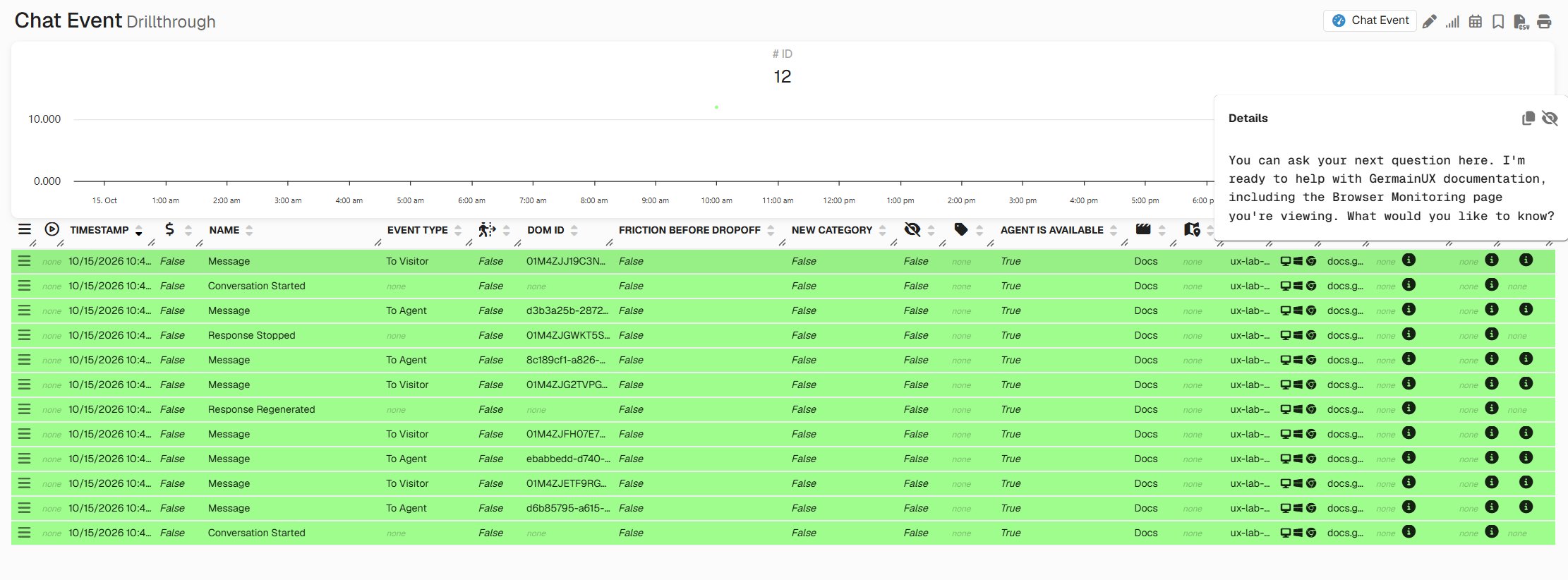
* Generic chat events and transactions.
* Customer interactions before, during, and after a conversation.
* The page and customer journey in which the conversation occurred.
* Available agent, bot, conversation, and session context.
* Browser and application errors affecting the conversation.
* Network requests and performance associated with Vercel.
* User-session evidence, including Session Replay when enabled.
* Conversation and application behavior at individual-session and aggregate levels.
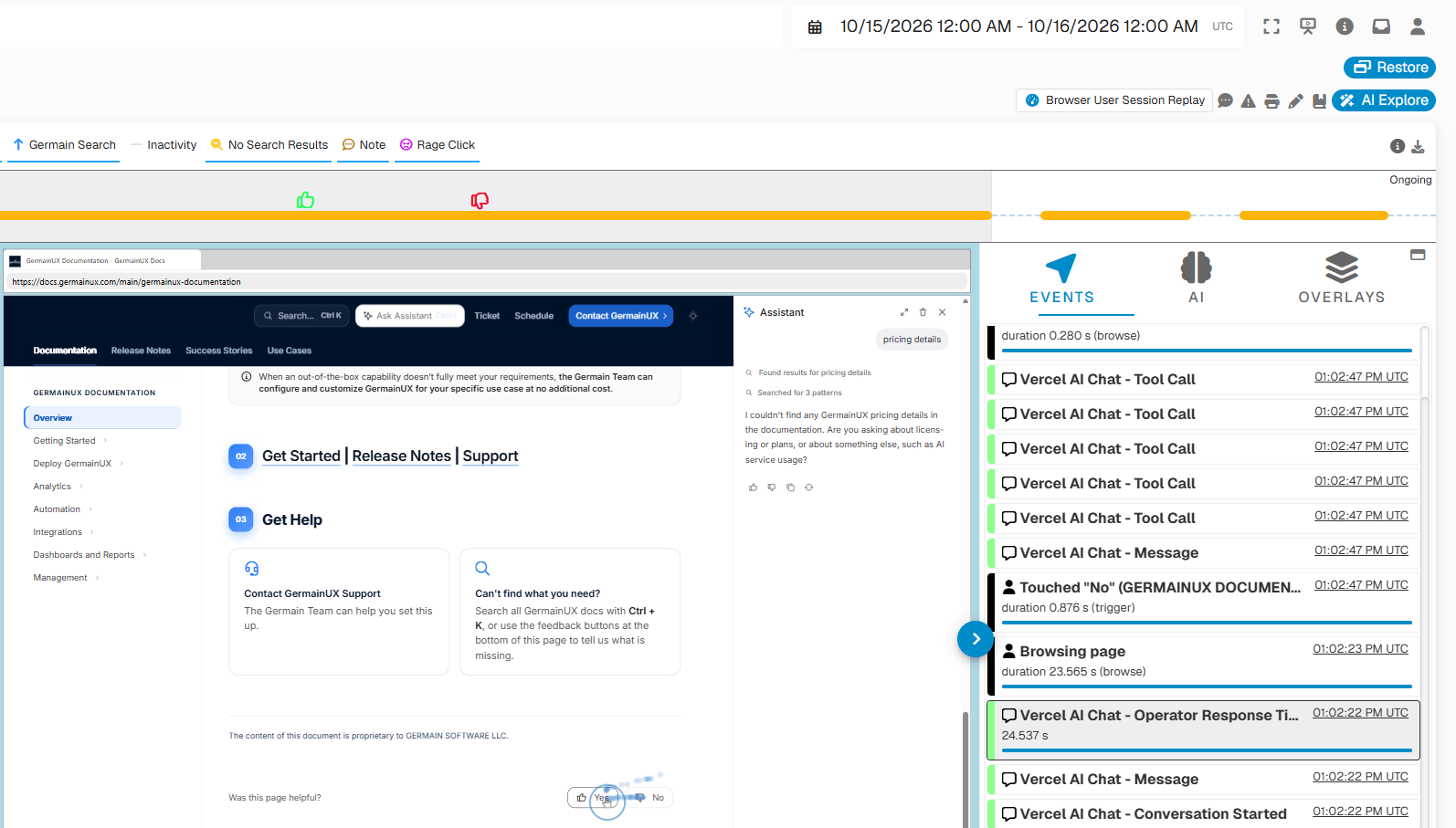 The available data depends on the events exposed by the Vercel Web API, the Vercel implementation, and the GermainUX monitoring configuration.
## Collected data
| Data category | Examples |
| - | - |
| Vercel events | Events exposed through the supported Vercel Web API |
| Messages | Messages exchanged among customers, agents, and bots |
| Chat events | Conversation and participant activity |
| Chat transactions | Measurable activity such as conversation or response duration when available |
| User activity | Clicks, navigation, page activity, and business-process steps |
| Browser context | Page, application, browser, device, user, and session |
| Technical evidence | JavaScript errors, network requests, long tasks, and resource activity |
The available data depends on the events exposed by the Vercel Web API, the Vercel implementation, and the GermainUX monitoring configuration.
## Collected data
| Data category | Examples |
| - | - |
| Vercel events | Events exposed through the supported Vercel Web API |
| Messages | Messages exchanged among customers, agents, and bots |
| Chat events | Conversation and participant activity |
| Chat transactions | Measurable activity such as conversation or response duration when available |
| User activity | Clicks, navigation, page activity, and business-process steps |
| Browser context | Page, application, browser, device, user, and session |
| Technical evidence | JavaScript errors, network requests, long tasks, and resource activity |
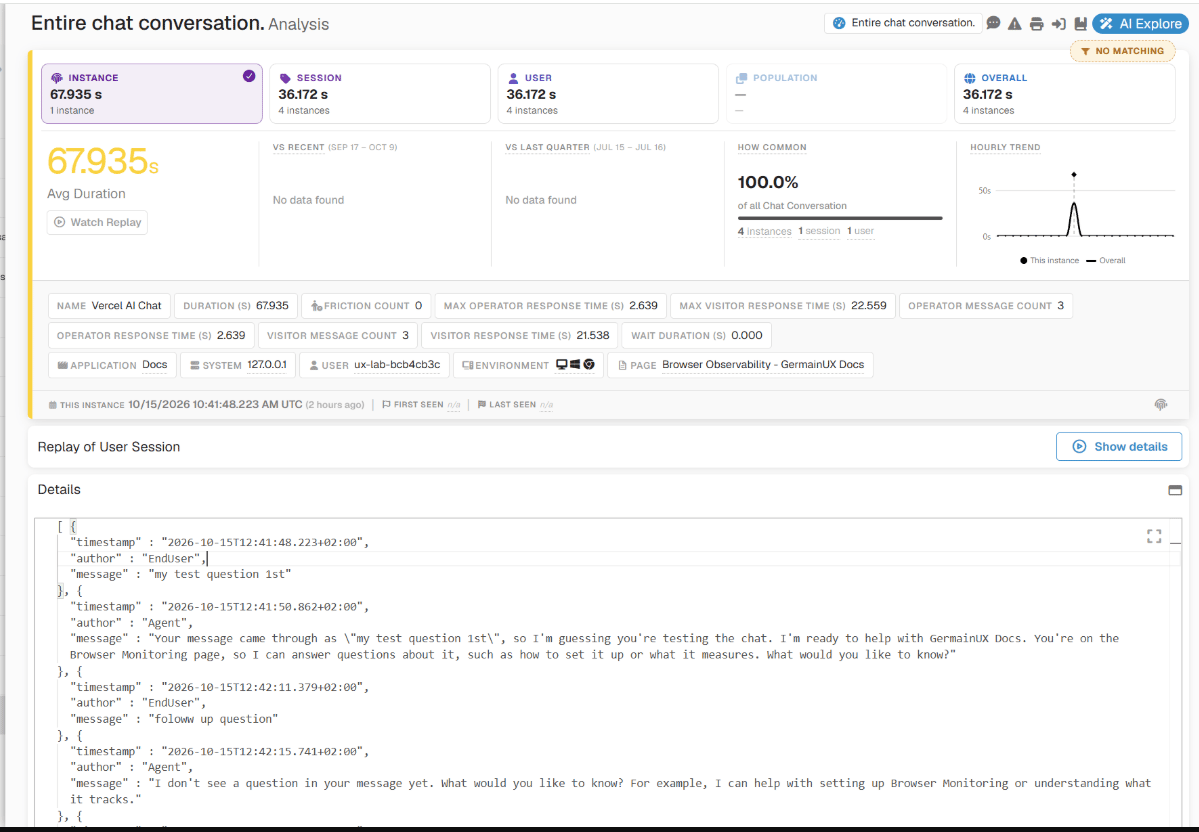 GermainUX collects only the Vercel data available within the monitored and authorized browser context.
## Business outcomes
Vercel Monitoring helps organizations improve:
| Area | Business outcome |
| - | - |
| Customer service | Identify conversations affected by unavailable agents, bot problems, technical errors, or slow application behavior. |
| Sales | Understand whether chat engagement helps or prevents customers from progressing through product discovery, checkout, or another conversion journey. |
| eCommerce | Correlate conversations with cart activity, abandonment, checkout, and purchase outcomes. |
| Bot effectiveness | Determine when customers successfully interact with a bot, repeat requests, encounter friction, or require an agent. |
| Agent productivity | Identify application or communication issues that delay responses and increase handling time. |
| Customer experience | Understand the complete experience surrounding a conversation rather than reviewing chat activity in isolation. |
| Technical support | Reproduce intermittent Vercel problems using browser, network, error, and session evidence. |
## Customer, agent, and bot analysis
GermainUX can help answer questions such as:
GermainUX collects only the Vercel data available within the monitored and authorized browser context.
## Business outcomes
Vercel Monitoring helps organizations improve:
| Area | Business outcome |
| - | - |
| Customer service | Identify conversations affected by unavailable agents, bot problems, technical errors, or slow application behavior. |
| Sales | Understand whether chat engagement helps or prevents customers from progressing through product discovery, checkout, or another conversion journey. |
| eCommerce | Correlate conversations with cart activity, abandonment, checkout, and purchase outcomes. |
| Bot effectiveness | Determine when customers successfully interact with a bot, repeat requests, encounter friction, or require an agent. |
| Agent productivity | Identify application or communication issues that delay responses and increase handling time. |
| Customer experience | Understand the complete experience surrounding a conversation rather than reviewing chat activity in isolation. |
| Technical support | Reproduce intermittent Vercel problems using browser, network, error, and session evidence. |
## Customer, agent, and bot analysis
GermainUX can help answer questions such as:
* Which customer journeys generate the most conversations?
* Which pages or workflow steps cause customers to request help?
* Are customers reaching an agent or remaining with a bot?
* Which conversations are associated with application errors?
* Are slow responses caused by Vercel, the surrounding application, or another dependency?
* Which issues affect the most customers?
* Do conversations contribute to conversion, abandonment, or workflow completion?
* What did the customer do before and after the conversation?
* Which technical problems prevent messages or conversation events from operating correctly?
## Continuous monitoring
GermainUX RUM JS or the GermainUX RUM Extension monitors Vercel activity during real user sessions.
Use:
* **RUM JS** when the GermainUX monitoring script can be deployed directly in the application.
* **RUM Extension** when direct script deployment is unavailable or the application’s security architecture prevents access to the required browser context.
The collected Vercel evidence is associated with the available customer, application, page, and session context.
 ## Technical investigation with JS Profiler
When a Vercel problem requires deeper investigation, the GermainUX JS Profiler can provide evidence such as:
## Technical investigation with JS Profiler
When a Vercel problem requires deeper investigation, the GermainUX JS Profiler can provide evidence such as:
* JavaScript function execution.
* Function duration.
* JavaScript errors and stack traces.
* Vercel-related network requests.
* Resource loading.
* Browser events and user interactions.
* Long-running browser tasks.
* DOM activity.
* Page and session context.
The JS Profiler complements continuous Vercel Monitoring. It should normally be enabled for a controlled scope when detailed technical evidence is required.
## Session Replay
When Session Replay is enabled, teams can review the user’s experience surrounding a Vercel conversation, subject to the configured privacy controls.
Session Replay can help show:
* What the customer was doing before opening the chat.
* Which page or workflow generated the need for assistance.
* Whether the chat interface appeared and operated correctly.
* What application errors or delays occurred.
* Whether the user abandoned or completed the workflow afterward.
Messages and input fields should be masked, excluded, or recorded only according to the organization’s privacy and compliance requirements.
## Analytics
GermainUX can analyze Vercel data through KPIs, measures, pivots, trends, drill-through views, and user-session context.
| Analysis area | Examples |
| - | - |
| Conversation activity | Conversations, events, and messages |
| Participants | Customer, agent, or bot |
| Performance | Conversation or response duration when available |
| Impact | Affected users, sessions, pages, and workflows |
| Journey | Activity before, during, and after the conversation |
| Outcome | Completion, conversion, escalation, or abandonment when configured |
| Technical context | JavaScript errors, network requests, long tasks, and resources |
| Experience evidence | Browser activity and Session Replay |
## KPIs
Vercel data can contribute to browser and chat analytics such as:
| KPI | Purpose |
| - | - |
| Chat Event | Captures supported conversation and participant activity. |
| Chat Transaction | Measures supported chat activity with a duration. |
| Browser Event | Captures application-specific Vercel or business events. |
| Browser Transaction | Measures an application-specific conversation or workflow interval. |
| JavaScript Console Event | Captures browser errors affecting Vercel. |
| Network Request | Measures related browser requests and failures. |
Custom KPIs can be created when the organization requires application-specific conversation, escalation, service, or conversion analysis.
## Automated analysis and notification
GermainUX can apply its analytics to the collected Vercel evidence to:
* Categorize recurring conversation or technical conditions.
* Identify outliers and abnormal trends.
* Quantify the users and sessions affected by an issue.
* Correlate conversations with application behavior and business outcomes.
* Detect configured phrases or messages of interest.
* Surface conversation-related events on the Session Replay timeline.
* Notify GermainUX users through Watches when existing insights meet conditions of interest.
A Watch provides a notification based on an insight already detected by GermainUX. It does not create the underlying Vercel insight.
## Integration
GermainUX relies on the supported [Vercel Web API](https://developers.channel.io/docs/web-channelio) to receive Vercel events available within the monitored application.
The application must:
* Have Vercel deployed and operating correctly.
* Load Vercel within a context accessible to the applicable GermainUX browser component.
* Permit the required Vercel and GermainUX scripts under its security policies.
* Allow the browser to communicate with the Vercel and GermainUX endpoints.
* Expose the supported events required by the monitoring use case.
## Configuration
Vercel Monitoring requires application-specific integration with the supported Vercel Web API.
Configuration typically includes:
Only collect the events and message information required for approved analytics use cases.
## Privacy and security
Vercel conversations can contain personal, confidential, financial, health, authentication, or other sensitive information.
Before enabling monitoring:
* Define which messages and events may be collected.
* Mask or exclude sensitive message content.
* Avoid collecting passwords, access tokens, payment credentials, or secrets.
* Apply consent requirements.
* Restrict access to conversations and Session Replay.
* Apply role-based access and appropriate retention.
* Validate customer, agent, and bot data separately.
* Review the integration after Vercel or application changes.
* Obtain approval from the organization’s privacy, security, and compliance owners.
Metadata and message content should be limited to what is necessary for the approved business purpose.
## Validation
After deployment:
## Deployment and configuration
* Deploy and validate Vercel within the monitored web application.
* Review [Browser Monitoring](/main/browser-monitoring).
* Review the [Browser Monitoring Deployment Overview](/main/deployment-for-browser-monitoring).
* Deploy [GermainUX RUM JS](/main/germain-ux-rum-js) when the monitoring script can be added to the application.
* Deploy the [GermainUX RUM Extension](/main/germain-ux-rum-extension) when direct script deployment is unavailable or access to the complete browser-page context requires an extension.
* Deploy the [GermainUX JS Profiler](/main/germain-ux-js-profiler) for deeper JavaScript, browser, and network diagnostics.
* Configure the supported [Vercel Web API](https://developers.channel.io/docs/web-channelio) events required by the monitoring use case.
* Review [Chat and CTI Monitoring](/main/chat-cti-monitoring).
* Review Chat Analysis.
* Configure [Metadata Extractors](/main/metadata-extractors) when additional approved user, conversation, or application context is required.
* Review the KPIs for Browser Monitoring.
* Review the [KPIs for User Monitoring and Replay](/main/user-monitoring-and-replay-kpis).
## Collected Data
This data will include:
| Item | Description / Details |
| - | - |
| Generic events | [Chat and CTI Monitoring](/main/chat-cti-monitoring) |
| Vercel events | [https://ai-sdk.dev/docs/ai-sdk-ui/stream-protocol#ui-message-stream-protocol](https://ai-sdk.dev/docs/ai-sdk-ui/stream-protocol#ui-message-stream-protocol) |
| Messages | GermainUX monitor messages exchanged between agents, bots, and customers. |
## Get Help
The Germain Team can help you set this up.
Search all GermainUX docs with **Ctrl + K**, or use the feedback buttons at the bottom of this page to tell us what is missing.
This documentation is built and hosted on [Mintlify](https://mintlify.com), a developer documentation platform.