

Monitoring components
Components needed for capture
Continuous monitoring
Capture rejections in live sessions
Error categorization
Promote rejections to errors
Deployment and configuration
Install and enable rejection capture
Overview
GermainUX automatically captures unhandled JavaScript Promise rejections that occur while users interact with monitored web applications. Each rejection is associated with the available application, page, browser, user, and session context, helping teams determine what failed, who was affected, and what the user experienced. By default, all unhandled Promise rejections are collected as events. They are not categorized as errors unless an error-categorization rule identifies them as such.Monitoring components
What is an unhandled Promise rejection?
A Promise is rejected when an asynchronous JavaScript operation fails. The rejection becomes unhandled when the application does not process it with an appropriate rejection handler. For example:- Failed API calls.
- Invalid or unexpected response data.
- Errors in asynchronous application logic.
- Missing rejection handlers.
- Third-party script failures.
- Authentication or authorization failures.
- Aborted or interrupted operations.
- Application state or timing problems.
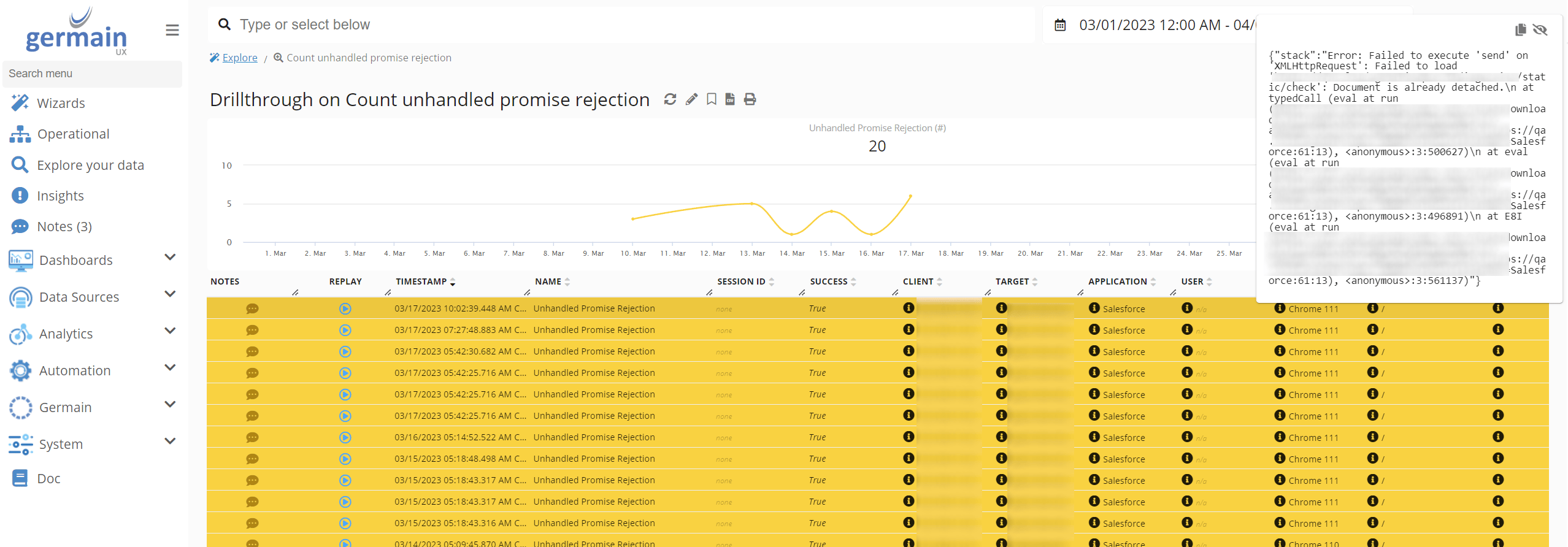
Capabilities
GermainUX can:- Detect unhandled Promise rejections affecting real users.
- Capture the available rejection reason or message.
- Associate the rejection with its application, page, browser, user, and session.
- Analyze frequency, recurrence, trends, and affected-user counts.
- Categorize selected rejections as errors.
- Correlate rejections with clicks, navigation, network requests, console errors, long tasks, and other browser activity.
- Show the rejection within the available Session Replay context.
- Use the JS Profiler to investigate the JavaScript functions and asynchronous activity associated with the failure.
Default monitoring
No configuration is required to collect unhandled Promise rejections as events.
Continuous monitoring
GermainUX RUM JS or the GermainUX RUM Extension continuously captures unhandled Promise rejections during real user sessions. Use:- RUM JS when the GermainUX monitoring script can be deployed directly in the application.
- RUM Extension when direct script deployment is unavailable or the application’s security architecture prevents access to the required browser context.
Code-level investigation with JS Profiler
When an unhandled rejection requires deeper technical analysis, the GermainUX JS Profiler can provide additional evidence, including:- JavaScript function execution.
- Function duration.
- Errors and available stack traces.
- Network requests and resource loading.
- Browser events and user interactions.
- Long-running browser tasks.
- DOM activity.
- Application, page, workflow, and session context.
Business benefits
Unhandled Promise Rejection Monitoring helps organizations:- Detect asynchronous failures that may not produce a visible application error.
- Identify the users, sessions, pages, and workflows affected.
- Find intermittent problems that are difficult to reproduce.
- Distinguish non-critical rejected operations from user-impacting errors.
- Prioritize failures according to frequency and actual business impact.
- Correlate asynchronous failures with API calls and user actions.
Show all 9
Show all 9
- Reduce the time required to identify the responsible front-end code or service.
- Detect regressions introduced by application releases.
- Validate whether a correction eliminated or reduced the rejection.
Analytics
GermainUX can analyze unhandled Promise rejections through KPIs, measures, pivots, trends, drill-through views, and session context.
GermainUX users can create watches to receive notifications when collected rejection insights meet conditions of interest.
Error categorization
By default, GermainUX stores unhandled Promise rejections as events rather than errors. Usesettings.plugins.unhandledRejection.errorCategorizer to identify the rejections that should also be categorized as errors.
The following example categorizes a rejection as an error when its reason contains the word error:
truewhen the rejection should be treated as an error.falsewhen it should remain a standard event.
Application-specific categorization
Error categorization can be based on known rejection messages or patterns:Privacy and security
Promise-rejection reasons can contain URLs, application data, identifiers, or other sensitive information. Before enabling application-specific collection or categorization:- Review the rejection information produced by the application.
- Avoid placing passwords, tokens, secrets, payment data, or personal information in rejection messages.
- Normalize or sanitize sensitive application messages when necessary.
- Restrict access to detailed error and Session Replay evidence.
- Apply appropriate masking and retention requirements.
- Review the configuration after application or third-party library changes.
Recommended investigation workflow
1
Use RUM JS or the RUM Extension to identify an unhandled Promise rejection
2
Determine the affected users, sessions, pages, and workflows
3
Review the rejection reason and related user activity
4
Correlate it with network requests, console errors, clicks, and Session Replay
5
Categorize it as an error when it represents a user-impacting failure
6
Enable the JS Profiler for a controlled scope when code-level evidence is required
7
Identify the responsible JavaScript function, asynchronous operation, API, or dependency
8
Add the appropriate rejection handling or correct the underlying failure
9
Validate the correction through continuous monitoring
Deployment and configuration
- Review Browser Monitoring.
- Review the Browser Monitoring Deployment Overview.
- Deploy GermainUX RUM JS when the monitoring script can be added to the application.
- Deploy the GermainUX RUM Extension when direct script deployment is unavailable or access to the complete browser-page context requires an extension.
- Deploy the GermainUX JS Profiler for deeper JavaScript and browser diagnostics.
- Review the available Browser Monitoring configuration.
Show all 11
Show all 11
- Review JavaScript Console and Error Monitoring.
- Review Network Request Monitoring.
- Review Dead, Error and Rage Click Monitoring.
- Review the KPIs for User Monitoring and Replay.
- Review the available Browser Monitoring KPIs.
Get Help
Contact GermainUX Support
The GermainUX team helps you get up and running faster, empower your team, turn data into actionable insights, and optimize performance to deliver measurable business outcomes.
Can't find what you need?
Search all GermainUX docs with Ctrl + K, or use the feedback buttons at the bottom of this page to tell us what is missing.
The content of this document is proprietary to GERMAIN SOFTWARE.