

What GermainUX Monitors
Data available for monitoring
CRM and Business-Process Correlation
Link calls to CRM workflows
User Experience Monitoring
Capture browser-side UX evidence
Error and Integration Monitoring
Failures across connected systems
What GermainUX Monitors
Depending on your RingCentral environment and the data available to GermainUX, monitoring can include:- Call start, connection, and end
- Incoming and outgoing calls
- Call duration
- Ringing and waiting time
- Call status and termination result
- Agent, user, or extension
Show all 13
Show all 13
- Call and session identifiers
- Call volume and concurrent activity
- Browser activity
- CRM activity
- Application and integration errors
- Business-process duration
- Supporting logs and infrastructure
Call Activity and Trends
GermainUX analyzes RingCentral activity across users, teams, applications, and time periods. Examples include:- Number of calls handled
- Average, median, and percentile call duration
- Call volume by agent or team
- Unusually short or long interactions
- Failed or interrupted calls
- Ringing and waiting time
Show all 9
Show all 9
- Concurrent call activity
- Total employee time spent on calls
- Changes in call behavior over time
Individual Interaction Analysis
GermainUX can reconstruct the lifecycle of an individual RingCentral interaction. A timeline can include:1
Call initiated
2
Ringing or waiting
3
Call connected
4
Conversation duration
5
Call ended
6
Related browser or CRM activity
7
Errors or unexpected technical events
Agent and Team Analysis
RingCentral activity can be analyzed by dimensions such as:- Agent
- Team
- Extension
- User role
- Call direction
- Call result
Show all 12
Show all 12
- Application
- CRM
- Business process
- Environment
- Time period
- Customer-defined business segment
CRM and Business-Process Correlation
RingCentral interactions often occur as part of a larger sales, service, or support workflow. When shared identifiers or reliable timestamps are available, GermainUX can correlate RingCentral activity with:- Salesforce
- Oracle Siebel CRM
- Microsoft Dynamics 365
- Customer-controlled CRM applications
- Cases and service requests
- Contacts
Show all 15
Show all 15
- Leads and opportunities
- Orders
- Agent navigation
- Browser activity
- HTTP requests
- Integration errors
- Backend transactions
- Logs
- Infrastructure conditions
- A long call associated with a slow CRM workflow
- A disconnected call occurring near a browser or network error
- Excessive after-call work caused by inefficient navigation
- Repeated interactions associated with an unresolved request
- A customer interaction affected by an integration failure
User Experience Monitoring
When the RingCentral interface or the related CRM can be monitored from the browser, GermainUX can capture additional user-experience evidence, including:- User clicks and navigation
- Page and component response time
- JavaScript errors
- Browser console events
- Slow or failed network requests
- HTTP errors
Show all 10
Show all 10
- Browser freezes
- Repeated user interactions
- User frustration
- Session Replay
Session Replay
When supported and enabled, Session Replay can show the browser activity surrounding a RingCentral interaction. It can help determine:- What the agent was doing before, during, and after a call
- Which CRM screens were used
- Whether an application error interrupted the workflow
- Whether steps were repeated
- Why after-call work took longer than expected
Error and Integration Monitoring
GermainUX can detect technical conditions affecting RingCentral-enabled workflows, including:- Failed or interrupted signaling activity
- JavaScript errors
- Slow or failed browser requests
- HTTP errors
- Authentication failures
- CRM integration errors
Show all 9
Show all 9
- CTI workflow failures
- Errors reported in accessible logs
- Connected-service availability or performance issues
Synthetic Monitoring
GermainUX RPA Bot Recorder and Engine can execute approved synthetic scenarios involving RingCentral and connected applications. Examples include:- Open the RingCentral web application
- Sign in with a test account
- Load the agent workspace
- Open a CRM record
- Verify RingCentral controls are available
- Execute an approved test interaction
- Confirm that an integrated workflow completes
Conversation and Sentiment Analysis
SIP call-signaling data does not contain the spoken conversation. When authorized transcripts, chat messages, notes, or other textual conversation content are provided through a supported integration, GermainUX can additionally analyze:- Sentiment
- Intent
- Conversation categories
- Recurring customer concerns
- Escalation indicators
- Agent and customer friction
Show all 9
Show all 9
- Conversation quality
- Business outcomes
- Customer-defined phrases or events
Analytics
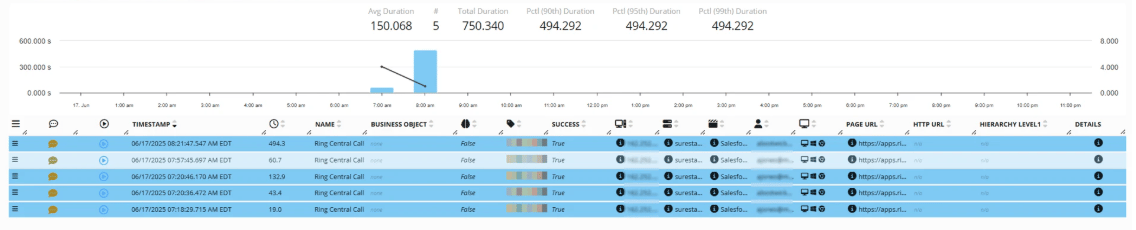
RingCentral monitoring data can be analyzed through GermainUX dashboards and analytics. Examples include:- Real-time and historical trends
- Call-volume analysis
- Duration distributions
- Agent and team comparisons
- Outlier and anomaly detection
- Workflow analysis
Show all 10
Show all 10
- Individual interaction drilldown
- Session timelines
- Custom dashboards and reports
- AI-assisted analysis when configured
SLAs, Alerts, and Automation
GermainUX can detect and notify teams about conditions such as:- Failed or interrupted calls
- Unusually short or long calls
- Excessive ringing or waiting time
- High call-failure rate
- Unexpected changes in call volume
- Slow CRM workflows
Show all 9
Show all 9
- Excessive after-call work
- Browser or integration errors
- Synthetic monitoring failures
Get More Information
GermainUX can help determine which monitoring, analytics and automation capabilities are appropriate for your Ring Central environment. Contact GermainUX Support.Get Help
Contact GermainUX Support
The GermainUX team helps you get up and running faster, empower your team, turn data into actionable insights, and optimize performance to deliver measurable business outcomes.
Can't find what you need?
Search all GermainUX docs with Ctrl + K, or use the feedback buttons at the bottom of this page to tell us what is missing.
The content of this document is proprietary to GERMAIN SOFTWARE.