

Chat Event Monitoring
Browser-side chat activity
Chat Transaction Monitoring
Spotting slow conversations
Analyze Chat at Scale
Averages and percentiles compared
Real-Time Dashboards & Automated Reports
Live chat and scheduled reports
GermainUX provides real-time Operational Experience Intelligence, Chat Analytics, User Experience Monitoring, Alerting, and Automation for Olark.
Monitoring Scope
Monitor the interactions occurring between website visitors and sales or service agents through Olark and correlate those interactions with the surrounding digital experience.Visibility Overview
Chat Event Monitoring
GermainUX captures Olark chat events using the Olark JavaScript API. Olark exposes browser-side events including:- Chat conversation started
- Message sent by visitor
- Message sent by operator
- Operator availability
- Operator unavailable
- Offline message sent
- Chatbox activity
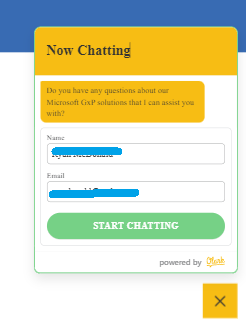
Visitor & Agent Interaction Monitoring
Monitor how visitors interact with agents or automated chat experiences. GermainUX can help teams understand:- When conversations begin
- Whether agents are available
- Messages sent and received
- Chat activity within a user session
- Conversation progression
- Interaction timing
Chat Transaction Monitoring
GermainUX provides a Chat Transaction KPI for measuring chat activity. Examples include:- Conversation duration
- Agent response time

Agent Availability Monitoring
Track Olark operator availability events. GermainUX can analyze whether agents are available when users attempt to engage through chat. Availability data can be correlated with:- User sessions
- Chat activity
- Application pages
- Conversation outcomes
Correlate Chat with the User Journey
Olark telemetry can be correlated with the broader website journey captured by GermainUX RUM. For example:VisitorProduct / Service PageOpen ChatAgent ResponseContinue Journey
or:
Visitor ProblemStart ChatAgent UnavailableUser Leaves
This makes it possible to analyze chat as part of the complete digital experience rather than as an isolated communication channel.
Identify Chat Friction
GermainUX can help identify chat conditions that may create user friction. Examples include:- Agent unavailable
- Long response time
- Long conversation duration
- Repeated chat activity
- Chat started but user journey does not continue as expected
Correlate with User Sessions
Because Olark monitoring operates through GermainUX RUM JS, chat telemetry can be associated with the user’s monitored browser session. This helps analysts move from an aggregate chat metric to the surrounding session context. For example:Slow Agent ResponseAffected User SessionPage / JourneySubsequent User Behavior
Chat KPIs
GermainUX provides preconfigured analytics for chat monitoring.Chat Event
Captures chat activity such as:- Agent availability
- Message sent
- Message received
- Other monitored chat events
Chat Transaction
Measures chat activity such as:- Conversation duration
- Agent response time
Analyze Chat at Scale
Use GermainUX analytics to identify whether chat conditions are:- Isolated to one session
- Associated with a particular application
- Concentrated around particular agents or agent groups where captured
- Recurring
- Affecting specific user populations
- Correlated with broader user-experience issues
Correlate Chat with Application Experience
Olark chat monitoring can be analyzed together with other browser and application telemetry collected by GermainUX. For example:Chat DelayUser SessionPage Performance
Chat EventBrowser ErrorUser Abandonment
Agent UnavailableUser JourneyExit
This helps distinguish chat-related friction from problems originating elsewhere in the digital experience.
Real-Time Dashboards & Automated Reports
Create dashboards and automated reports for Olark monitoring. Examples include:- Chat activity
- Conversation count
- Agent availability
- Conversation duration
- Agent response time
- Chat trends
- Chat events by application
- Chat experience by user population
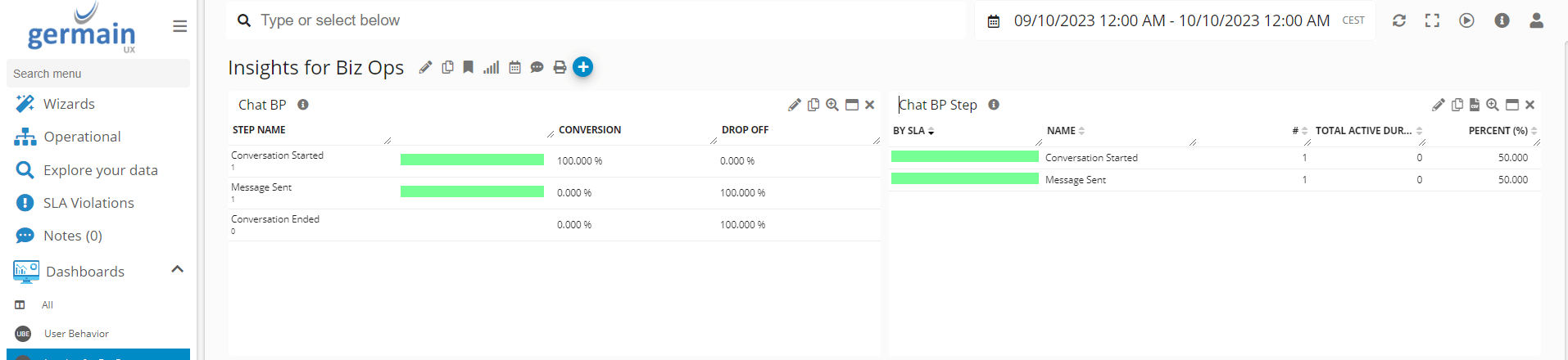
Alerts & SLA Monitoring
Configure SLAs and alerts for chat conditions requiring attention. Examples include:- Agent response time exceeds threshold
- Conversation duration exceeds threshold
- Agent availability changes
- Unexpected reduction in chat activity
- Critical chat event detected
Automation
Olark chat conditions can trigger GermainUX automation. For example:MonitorDetectAnalyzeAlertAutomate
Depending on the use case, automation can include:
- Notifications
- Reports
- Operational workflows
- HTTP actions
- Other configured actions
Integration
GermainUX integrates with the Olark JavaScript API through the browser and captures relevant Olark events using RUM JS. Olark currently exposes callbacks for conversation start, visitor/operator messages, operator availability, offline messages, and other chatbox events. See Deploy Monitoring for Olark for deployment instructions.Get More Information
Olark environments can vary significantly depending on storefront customization, extensions, integrations, infrastructure, and security requirements. The GermainUX team can help configure the appropriate monitoring scope, privacy controls, analytics, alerts, and automation for your Olark environment. Please contact us for any help.Get Help
Contact GermainUX Support
The GermainUX team helps you get up and running faster, empower your team, turn data into actionable insights, and optimize performance to deliver measurable business outcomes.
Can't find what you need?
Search all GermainUX docs with Ctrl + K, or use the feedback buttons at the bottom of this page to tell us what is missing.
The content of this document is proprietary to GERMAIN SOFTWARE.