
🔒 Configure Privacy Exclusions
GermainUX provides configurable mechanisms for protecting sensitive information in analytics data and Session Replay recordings.
Depending on the use case, a value or element can be:
|
Option |
Meaning |
|---|---|
|
Masked |
— replaced with characters such as |
|
Anonymized |
— replaced with a hashed representation |
|
Excluded |
— prevented from being collected, transmitted, or stored |
These controls help prevent information such as usernames, email addresses, IP addresses, payment-card details, and sensitive form values from being exposed through GermainUX.
📄 Privacy Rule Types
|
Rule type |
Description |
|---|---|
|
Data Field Exclusion |
Protects fields collected for analytics, such as usernames, IP addresses, email addresses, or custom properties. |
|
Session Replay Exclusion |
Protects HTML and DOM elements, such as payment or personal-information fields, from appearing in Session Replay recordings. |
⚙️ Data Field Exclusion
A Data Field Exclusion rule protects a field collected through one or more KPIs.
The rule can:
|
Action |
|---|
|
Mask the field |
|
Anonymize its value |
|
Exclude it from collection |
|
Apply only to selected KPIs |
|
Preserve character length or whitespace when masking |
|
Apply protection only to content matching a regular expression |
💡 Create a Data Field Exclusion Rule
-
Go to GermainUX Workspace > Analytics > Data Privacy.
-
Click +.
-
Select Data Field Exclusion.
-
Complete the configuration.
-
Save the rule.
📋 Configuration Fields
|
Field |
Description |
|---|---|
|
Name |
Descriptive name for the rule, such as |
|
Field Name |
Data-model field to protect, such as |
|
KPI |
Optional restriction that applies the rule only to selected KPIs. |
|
Type |
Privacy control to apply: Mask, Anonymize, or Exclude. |
|
Preserve Length |
Maintains the original number of characters when masking. |
|
Preserve Whitespace |
Retains spaces while masking the other characters. |
|
Pattern |
Optional regular expression used to protect only matching content. |
📌 Example: Mask a Username
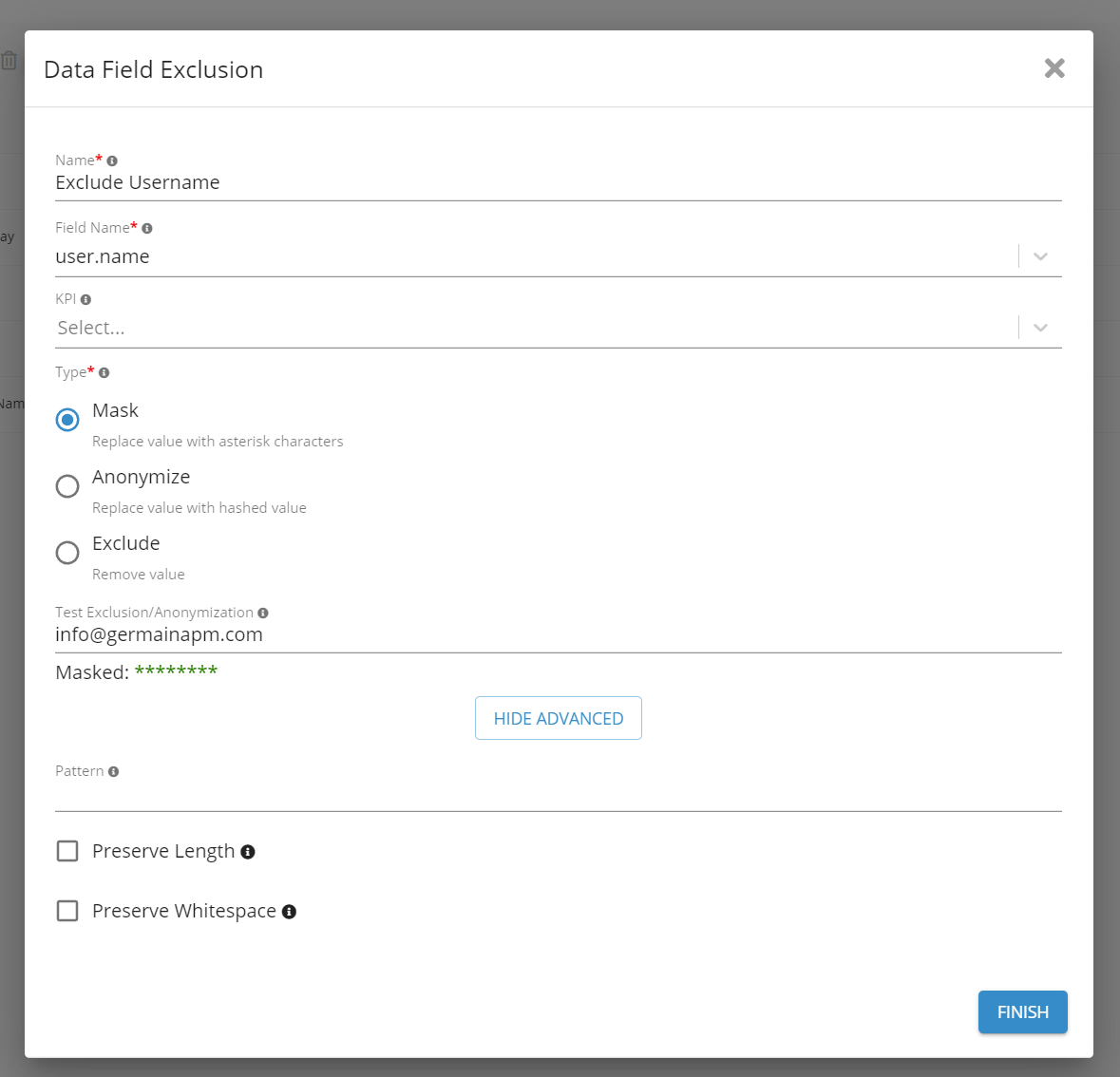
The following configuration masks user.name without preserving its original length or whitespace:
|
Field |
Value |
|---|---|
|
Name |
|
|
Field Name |
|
|
Type |
|
|
Preserve Length |
|
|
Preserve Whitespace |
|
🎥 Session Replay Exclusion
A Session Replay Exclusion rule protects sensitive HTML or DOM content from appearing in recorded sessions.
Elements are selected using CSS selectors. Each matching element can then be masked, anonymized, or excluded.
🔧 Create a Session Replay Exclusion Rule
-
Go to GermainUX Workspace > Analytics > Data Privacy.
-
Click +.
-
Select Session Replay Exclusion.
-
Complete the configuration.
-
Save the rule.
📋 Configuration Fields
|
Field |
Description |
|---|---|
|
Application Profile |
UX Monitoring Profile to which the rule applies, such as |
|
Name |
Descriptive name for the privacy rule. |
|
Element Selector |
CSS selector identifying the HTML or DOM elements to protect. |
|
Type |
Privacy control to apply: Mask, Anonymize, or Exclude. |
|
Preserve Length |
Maintains the original number of characters when masking. |
|
Preserve Whitespace |
Retains spaces while masking other characters. |
|
Pattern |
Optional regular expression used to protect matching content within the selected elements. |
💳 Example: Exclude Payment-Card Fields
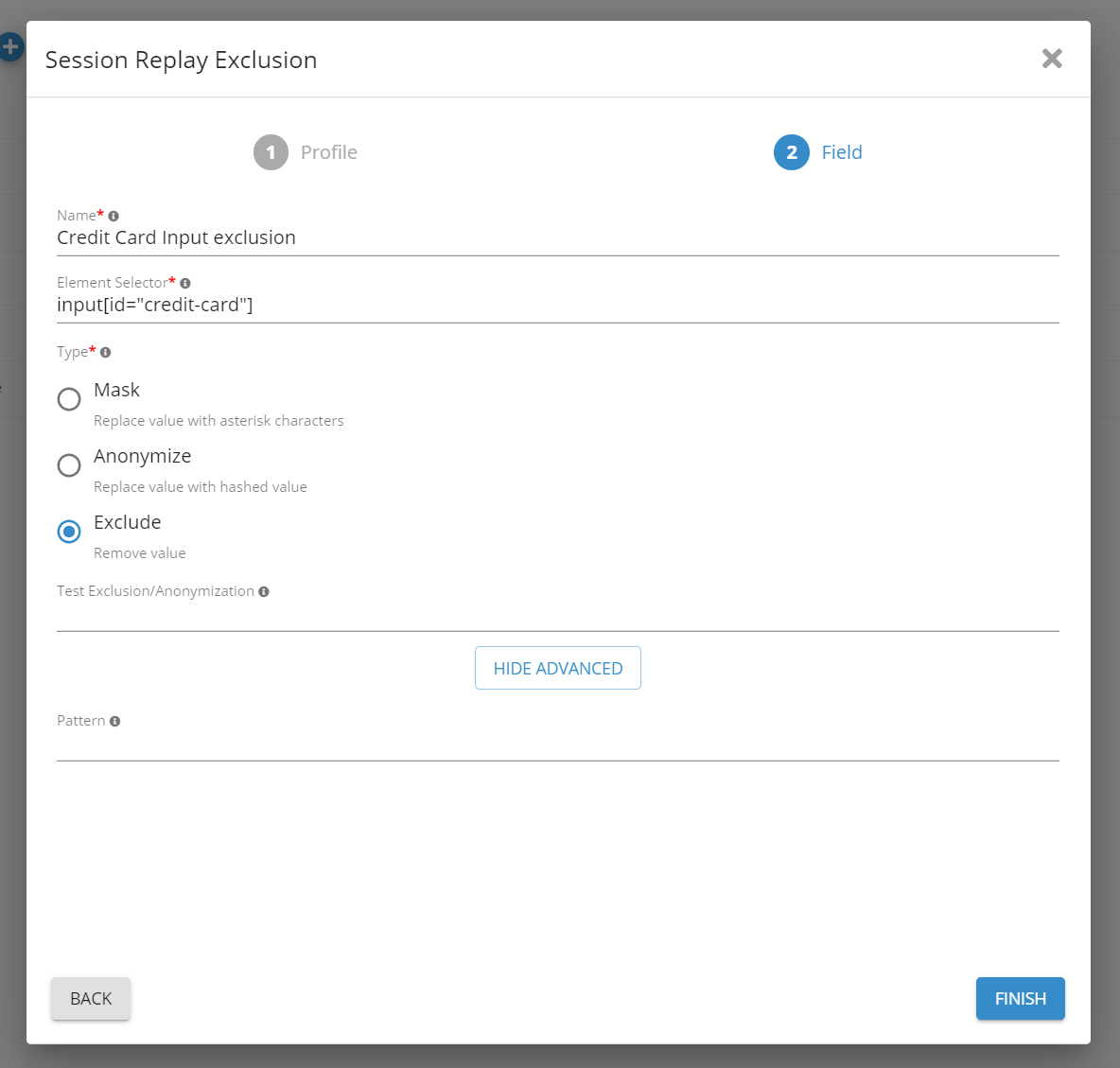
The following rule excludes input elements whose autocomplete attribute begins with cc-:
|
Field |
Value |
|---|---|
|
Name |
|
|
Element Selector |
|
|
Type |
|
This selector can match standardized payment fields such as card number, expiration date, and security-code inputs.
✅ Validation Recommendations
After creating a rule:
|
Check |
|---|
|
Test it in a non-production environment. |
|
Confirm that it applies to every intended field or element. |
|
Verify that protected values do not appear in analytics or Session Replay. |
|
Test dynamic pages, embedded components, and single-page application navigation. |
|
Confirm that the selector or regular expression does not hide unrelated information. |
|
Repeat validation whenever the monitored application changes. |
When sensitive data is not required for monitoring, use Exclude so the value does not enter the GermainUX data pipeline.
ℹ️ Get Help
The Germain Team can help you set this up. Contact GermainUX Support.
Service: Management
Feature Availability: 2014.1 or later