

Benefits
Spot browser policy issues
Browser interventions
What browsers intervene on
Browser support
Chromium browser compatibility
Deployment and configuration
Enable report collection
Overview
GermainUX RUM JS collects supported reports generated by the browser when a monitored application uses deprecated functionality, violates a browser policy, or triggers a browser intervention. This monitoring helps developers identify browser compatibility, security-policy, and future-support issues affecting real users.Benefits
GermainUX helps teams:- Identify deprecated browser features still used by an application.
- Detect Content Security Policy violations.
- Detect Permissions Policy violations.
- Identify browser interventions that alter or block application behavior.
- Determine which users, pages, browsers, and application versions are affected.
- Analyze whether violations increased after a release.
Show all 9
Show all 9
- Correlate browser reports with user activity, errors, network requests, and Session Replay.
- Prioritize corrections according to frequency and user impact.
- Notify developers when an important browser report is detected.
Preconfigured monitoring
Browser-report monitoring is preconfigured in GermainUX RUM JS. When supported by the browser, GermainUX automatically collects the following report types:
No customization is normally required. Additional configuration is needed only when customers want to change the default collection, filtering, categorization, or notification behavior.
Content Security Policy violations
Content Security Policy controls which scripts, styles, images, frames, connections, and other resources a page can use. GermainUX can collect supported CSP violations such as:- Blocked script
- Blocked stylesheet
- Blocked image or font
- Blocked network connection
- Blocked frame
- Inline script or style violation
- Disallowed resource origin
- Other violations reported by the browser
Permissions Policy violations
Permissions Policy allows an application to control access to browser capabilities. Depending on browser support, GermainUX can detect attempts to use a restricted capability, such as:- Camera
- Microphone
- Geolocation
- Clipboard
- Fullscreen
- Payment
- Autoplay
- Other policy-controlled browser features
Deprecated features
Browsers can report when an application uses a feature that is deprecated or planned for removal. These insights help development teams:- Find obsolete browser APIs.
- Identify pages and workflows that still depend on them.
- Determine which users and browsers encounter the deprecated behavior.
- Prioritize remediation before browser support is removed.
- Validate that a new application release no longer uses the feature.
Browser interventions
A browser intervention occurs when the browser changes, blocks, or restricts behavior to protect performance, security, privacy, or usability. Examples can include:- Blocking an unsupported or unsafe action
- Restricting autoplay
- Preventing an inefficient operation
- Altering resource-loading behavior
- Applying another browser-defined intervention
Collected information
Depending on the browser and report type, a browser-report fact can contain:- Report type
- Report name
- Message
- Page or document URL
- Source file
- Line and column
Show all 13
Show all 13
- Blocked resource or directive
- Browser and browser version
- Application and environment
- Application version
- Event timestamp
- User session
- Other authorized metadata
Analysis
Browser reports can be analyzed using measures such as:- Report count
- Unique users affected
- Unique sessions affected
- Unique pages affected
- Report rate
- New report count
- SLA-violation count
- Report type
- Report name
- Message
- CSP directive
- Page or route
- Source file
Show all 14
Show all 14
- Application
- Environment
- Application version
- Browser
- Browser version
- Operating system
- User or team
- Time period
- Which CSP directive produces the most violations?
- Did new violations appear after a release?
- Are violations isolated to one browser version?
- Which pages or workflows are affected?
- Did the report coincide with a failed feature, JavaScript error, or user abandonment?
Session Replay and correlation
When Session Replay is enabled, a browser report can be associated with the user session in which it occurred. GermainUX can help correlate the report with:- User interactions
- Page navigation
- JavaScript errors
- Console events
- Network requests
- Popup dialogs
Show all 10
Show all 10
- Business-process milestones
- Application version
- User-visible errors
- Abandonment or workflow failure
Notifications
A browser-report insight can be used to:- Trigger an alert when an SLA is violated.
- Notify interested GermainUX users through a Watch.
- Appear in a dashboard or report.
- Initiate an approved development or investigation workflow.
Optional customization
Customize the preconfigured monitoring only when required. Possible customizations include:- Include or exclude selected report types.
- Exclude known, accepted, or third-party violations.
- Categorize reports by application area or owner.
- Associate reports with an application version.
- Change severity according to report type.
- Define a custom SLA.
- Create a Watch for a specific report.
- Correlate a violation with an application or business-process KPI.
Browser support
Browser-report monitoring depends on browser reporting APIs. The documented GermainUX capability is primarily available in supported Chromium-based browsers, including:- Google Chrome
- Microsoft Edge
- Opera
Limitations
Browser Deprecated Features and Policy Violations Monitoring is not:- A complete application-security scanner
- A penetration-testing tool
- Proof of regulatory compliance
- A complete CSP-management solution
- A guarantee that every deprecated API will be reported
- A replacement for browser compatibility testing
- A record of policy violations that occur before RUM JS starts
- A source of reports that the browser does not expose
Security and privacy
Browser reports can contain URLs, source filenames, blocked origins, and other application details. Before production use:- Review which report properties are collected.
- Exclude sensitive URL parameters.
- Remove authentication tokens and secrets.
- Mask sensitive user or business identifiers.
- Restrict access to detailed technical reports.
- Apply appropriate retention policies.
- Review reports originating from browser extensions or third parties before sharing them externally.
Validation
- Deploy GermainUX RUM JS.
- Open the monitored application in a supported browser.
- Confirm that the browser supports the required reporting API.
- Generate an approved test violation or deprecated-feature event.
- Confirm that a browser-report fact appears in GermainUX.

- Verify its type, message, page, browser, and timestamp.
- Confirm that it is associated with the correct user session.
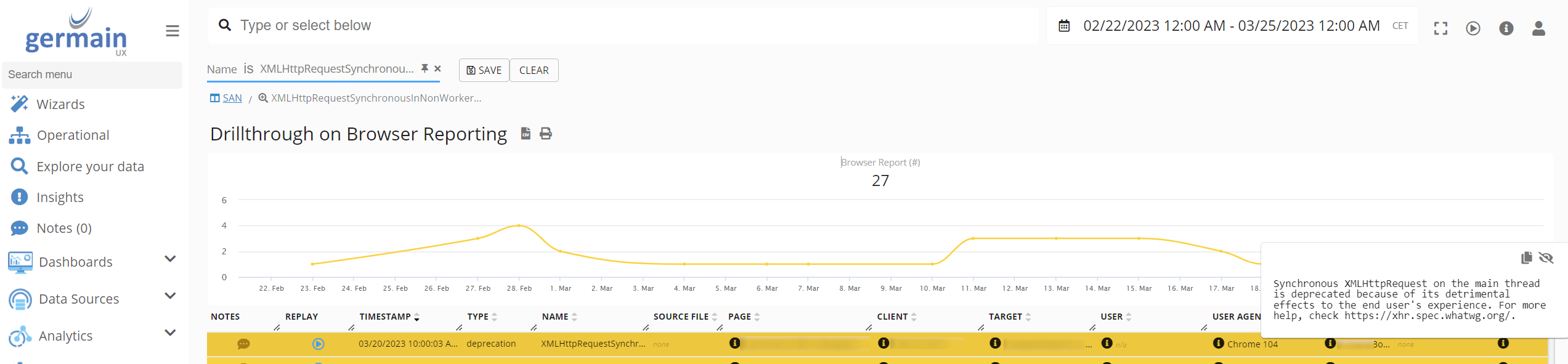
- Validate any configured category, SLA, alert, or Watch.
- Repeat the test with the browser versions used in production.
Troubleshooting
If browser reports are not collected:1
Confirm that RUM JS is loaded and running
2
Verify that the browser supports and exposes the expected report type
3
Confirm that browser-report monitoring is enabled in the UX Monitoring Profile
4
Check whether the event occurred before RUM JS initialized
5
Verify that the application URL matches the monitoring profile
6
Check consent, sampling, and privacy settings
7
Confirm that telemetry reaches GermainUX
8
Review browser-console errors
9
Verify that the tested condition actually generates a browser report
10
Test in a supported Chromium-based browser
Deployment and configuration
- Deploy GermainUX RUM JS.
- Use the preconfigured browser-report monitoring unless customization is required.
- Validate CSP, Permissions Policy, deprecated-feature, and intervention reporting in supported browsers.
- Review the available Browser Monitoring KPIs.
- Configure exclusions, categories, SLAs, alerts, Watches, dashboards, or reports only when required.
- Correlate reports with Session Replay, JavaScript errors, network requests, application versions, and business processes.
- Review URL and source information for sensitive data before production rollout.
Get Help
Contact GermainUX Support
The GermainUX team helps you get up and running faster, empower your team, turn data into actionable insights, and optimize performance to deliver measurable business outcomes.
Can't find what you need?
Search all GermainUX docs with Ctrl + K, or use the feedback buttons at the bottom of this page to tell us what is missing.
The content of this document is proprietary to GERMAIN SOFTWARE.