

Current Core Web Vitals
Metrics that matter now
Interaction to Next Paint
Measure page responsiveness
SLAs and notifications
Set thresholds and alerts
Deployment and configuration
Collect all vitals automatically
Overview
GermainUX RUM JS collects browser performance metrics from real user sessions, helping teams identify pages and user segments affected by slow loading, poor responsiveness, or visual instability.Current Core Web Vitals
The current Core Web Vitals are:Interaction to Next Paint replaced First Input Delay as a Core Web Vital on 2024-03-12. FID can remain available as a legacy browser-performance metric in GermainUX, but it should no longer be presented as a current Core Web Vital. Google Web Vitals documentation
Benefits
Core Web Vitals monitoring helps teams:- Measure actual page performance experienced by real users.
- Identify slow or unstable pages.
- Detect responsiveness problems affecting user interactions.
- Compare performance across browsers, devices, locations, and application versions.
- Identify regressions following a release.
- Correlate poor performance with abandonment, conversion loss, or reduced productivity.
- Replay affected sessions to understand the surrounding user experience.
- Prioritize improvements according to affected users and business impact.
Preconfigured monitoring
Core Web Vitals monitoring is preconfigured in GermainUX RUM JS. Once RUM JS is deployed, supported browser-performance metrics are automatically collected. No additional configuration is normally required. Customization is needed only when customers want to:- Change thresholds or SLAs.
- Exclude pages or user segments.
- Create application-specific measures or pivots.
- Configure additional performance marks.
- Add custom notifications or reports.
- Extend responsiveness monitoring for a GermainUX version that does not yet collect INP.
Largest Contentful Paint
Largest Contentful Paint measures how long it takes for the largest visible image or text block in the viewport to render.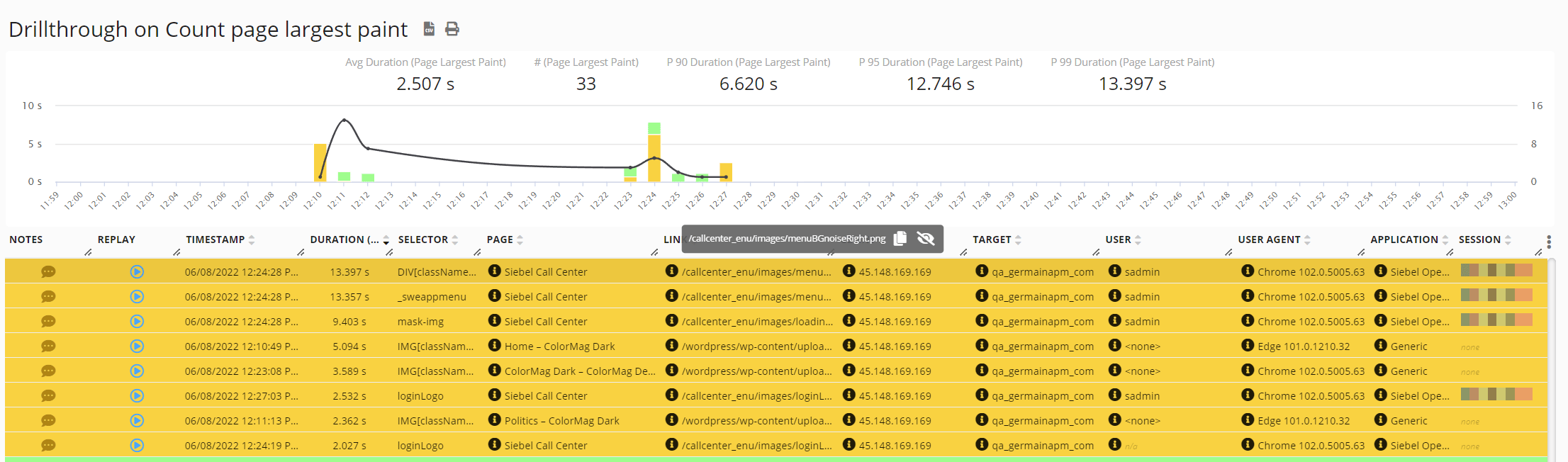
- Page or route
- Application
- Environment
- Application version
- Browser and browser version
- Device
Show all 10
Show all 10
- Operating system
- Geography
- User or customer segment
- Network context, when available
- Slow server response
- Large images
- Delayed resource loading
- Render-blocking JavaScript or CSS
- Client-side rendering delays
- Slow third-party resources
Interaction to Next Paint
Interaction to Next Paint measures page responsiveness across user interactions. It includes input delay, event-handler execution, and the time required to display the next frame. INP helps identify pages that feel slow or unresponsive when users click, tap, or type. When INP collection is supported by the installed GermainUX version, it can be analyzed alongside:- User Click duration
- JavaScript long tasks
- Browser freezes
- Slow JavaScript functions
- Network requests
- Page memory
- Session Replay
- Business-process duration
First Input Delay
First Input Delay measures the delay between a user’s first interaction and the browser’s ability to begin processing it. GermainUX versions that collect FID can expose it as a measure associated with the initial user interaction. FID remains useful for historical comparison but is no longer a current Core Web Vital. It measures only the delay before processing the first interaction and does not measure the complete interaction lifecycle.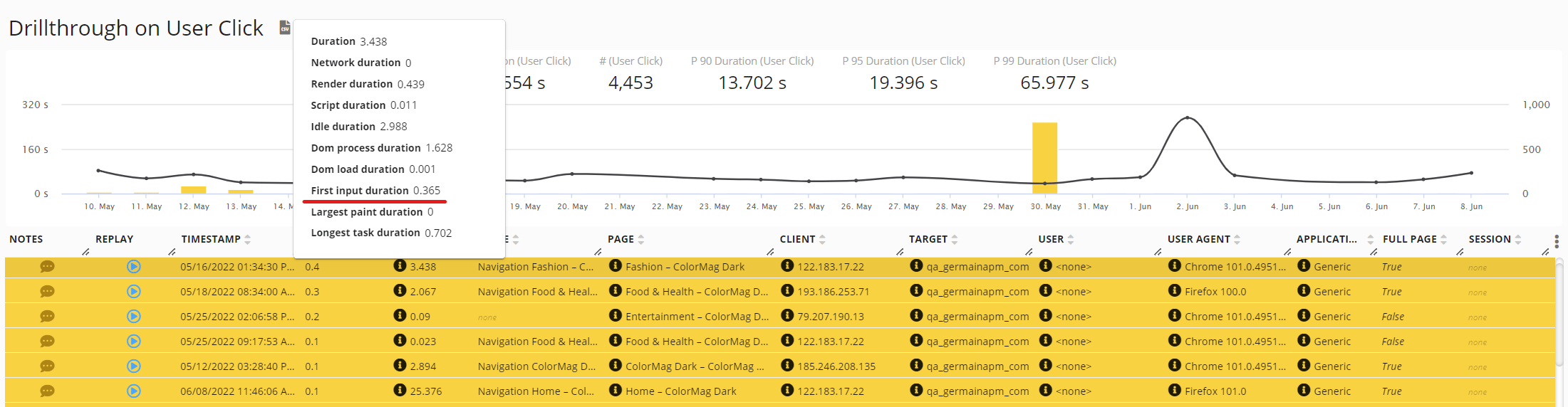
Cumulative Layout Shift
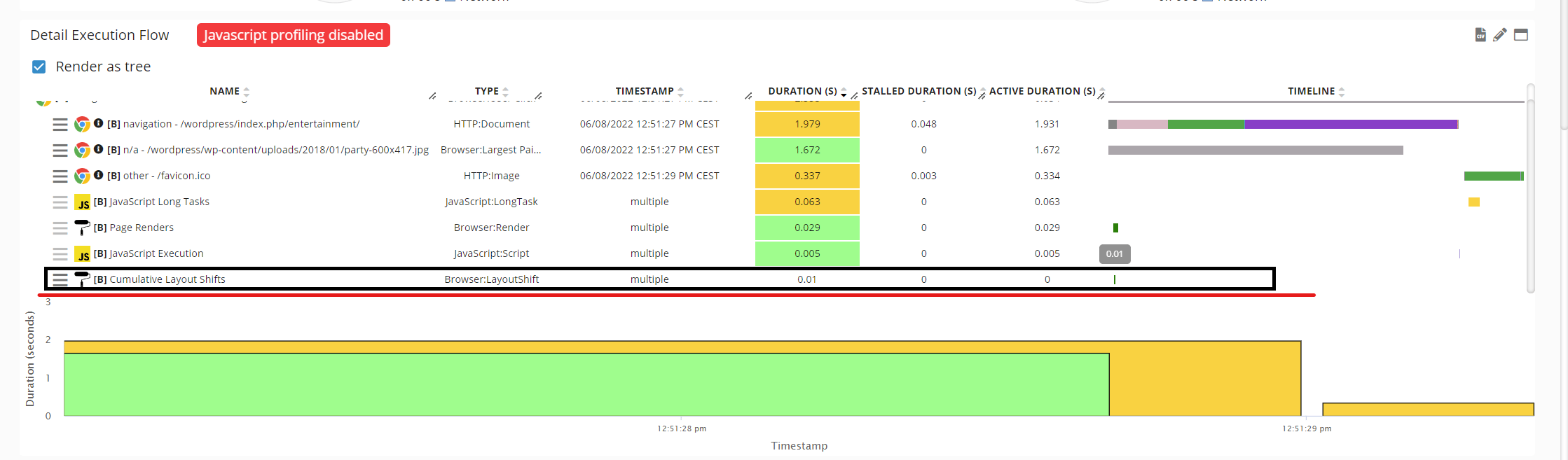
Cumulative Layout Shift measures unexpected movement of visible page content. A poor CLS can result in:- Users clicking the wrong element
- Buttons or links moving before interaction
- Forms becoming difficult to complete
- Content shifting while being read
- Increased user frustration
- Checkout or workflow errors
Analysis
Core Web Vitals can be analyzed using:- Average
- Median
- Percentiles
- Minimum and maximum
- Number of affected users
- Number of affected sessions
Show all 9
Show all 9
- SLA-violation count
- Performance trend
- Comparison with another period or release
- Page or route
- Application
- Environment
- Application version
- Browser
- Browser version
Show all 13
Show all 13
- Device
- Operating system
- Geography
- User role
- Customer segment
- Business process
- Conversion outcome
Business impact
Core Web Vitals can be correlated with business and user-experience outcomes.
A poor Core Web Vital does not by itself prove that a user abandoned or failed a task. Correlating the metric with user behavior and business outcomes provides the required context.
Session Replay and root-cause analysis
When Session Replay is enabled, teams can review what occurred during an affected session. GermainUX can correlate Core Web Vitals with:- Page loads
- User interactions
- JavaScript errors
- Network requests
- Browser long tasks
- Browser freezes
Show all 10
Show all 10
- Page memory
- Application version
- Business-process milestones
- Conversion or abandonment
SLAs and notifications
Configure an SLA only when the preconfigured thresholds do not meet the organization’s requirements. Core Web Vitals can be used to:- Identify pages exceeding a performance threshold.
- Trigger an alert when poor performance affects a significant number of users.
- Notify interested users through a Watch.
- Generate a dashboard or report.
- Compare performance before and after a release.
- Initiate an approved investigation workflow.
Browser support and limitations
Core Web Vitals depend on browser APIs and actual user activity. Consider the following:- Not every metric is available in every browser.
- INP requires the user to interact with the page.
- A page with no qualifying interaction may not produce an INP value.
- LCP can change as larger content appears.
- CLS depends on layout changes observed during the page lifecycle.
- Single-page applications require correct route and page identification.
Show all 9
Show all 9
- Short or interrupted sessions may not produce complete measurements.
- Cross-origin frames can limit the data visible to RUM JS.
- Available metrics depend on the deployed GermainUX version.
Privacy
Core Web Vitals are performance measurements, but their associated sessions can contain user and business context. Before production deployment:- Collect only the metadata required for analysis.
- Mask or exclude sensitive Session Replay content.
- Restrict access to user-level information.
- Configure consent where required.
- Apply the organization’s retention policy.
- Avoid unnecessary collection of personal or device identifiers.
Validation
- Deploy GermainUX RUM JS.
- Open the monitored application in a supported browser.
- Load several representative pages.
- Perform user interactions so responsiveness metrics can be calculated.
- Confirm that LCP and CLS appear in GermainUX.
- Confirm whether the installed GermainUX version reports INP.
- If applicable, verify that legacy FID is labeled separately from current Core Web Vitals.
- Confirm that page, application, browser, device, and version properties are correct.
- Compare the results with the browser’s performance tools.
- Verify associated Session Replay and technical evidence.
Deployment and configuration
- Deploy GermainUX RUM JS.
- Use the preconfigured Core Web Vitals monitoring unless customization is required.
- Confirm which GermainUX version is required for LCP, INP, CLS, and legacy FID collection.
- Configure stable page and route names for single-page applications.
- Review the available Browser Monitoring KPIs.
- Customize SLAs, measures, pivots, dashboards, alerts, Watches, or reports only when required.
- Use Element and Mark Performance Monitoring for application-specific performance milestones.
- Correlate poor performance with Session Replay, JavaScript, network, workflow, and business outcomes.
Feature availability: LCP, CLS, and FID monitoring are documented for GermainUX 2022.2 or later; confirm INP support for the installed GermainUX version. ✨ Feature Germain collects all Core Web Vitals metrics to boost your website performance and improve user experience.
Largest Contentful Paint (LCP)
LCP measures perceived load speed as it marks when the page’s main content (image or text block) visible within the viewport has likely loaded. KPI:KPIs for User Monitoring and Replay | Core Web Vitals KPIsFirst Input Delay (FID)
First Input Delay (FID) measures load responsiveness as it quantifies the experience users feel when trying to interact with unresponsive pages. Collected data is accessible on User Click KPI asFirst Input Duration measure.
Cumulative Layout Shift (CLS)
Cumulative Layout Shift (CLS) measures visual stability as it quantifies how often users experience unexpected layout shifts. Collected data is accessible on User Click KPI but only on the Detail Execution Flow portlet.Get Help
Contact GermainUX Support
The GermainUX team helps you get up and running faster, empower your team, turn data into actionable insights, and optimize performance to deliver measurable business outcomes.
Can't find what you need?
Search all GermainUX docs with Ctrl + K, or use the feedback buttons at the bottom of this page to tell us what is missing.
The content of this document is proprietary to GERMAIN SOFTWARE.