> ## Documentation Index
> Fetch the complete documentation index at: https://docs.germainux.com/llms.txt
> Use this file to discover all available pages before exploring further.

# SAP Commerce Cloud Operational Experience Intelligence

> GermainUX helps organizations improve the user experience, adoption, productivity, availability, and business performance of SAP applications.

export const GxFooter = () => <p className="gx-fine">The content of this document is proprietary to GERMAIN SOFTWARE LLC.</p>;

export const GxStyle = () => <style>{`
.gx-meta { display:flex; flex-direction:column; gap:10px; margin:22px 0 6px; padding:16px 18px; border:1px solid rgba(15,23,42,.08); border-radius:16px; background:rgba(46,125,242,.035); font-size:13.5px; }
.gx-meta-row { display:flex; flex-wrap:wrap; align-items:center; gap:6px; }
.gx-meta-label { width:96px; flex:none; color:#64748b; }
.dark .gx-meta-label { color:#94a3b8; }
.gx-meta code { border-color:rgba(46,125,242,.25) !important; color:#1A5FC8 !important; background:rgba(46,125,242,.08) !important; }
.dark .gx-meta { background:linear-gradient(135deg,rgba(46,125,242,.16),rgba(0,17,42,.4)); border-color:rgba(91,156,255,.22); }
.dark .gx-meta code { color:#BFD6FF !important; background:rgba(91,156,255,.12) !important; border-color:rgba(91,156,255,.28) !important; }
.gx-list ul { columns:2; column-gap:24px; list-style:none !important; padding-left:0 !important; margin:14px 0 0 !important; }
.gx-list li { break-inside:avoid; position:relative; padding:4px 0 4px 22px !important; margin:0 !important; font-size:14.5px; }
.gx-list li::marker { content:""; }
.gx-list li::before { content:""; position:absolute; left:3px; top:13px; width:7px; height:7px; border-radius:50%; background:#2E7DF2; opacity:.75; }
.dark .gx-list li::before { background:#5B9CFF; }
.gx-flow { display:flex; flex-wrap:wrap; align-items:center; gap:8px; margin:16px 0; }
.gx-flow span { display:inline-flex; align-items:center; padding:6px 12px; border-radius:999px; font-size:13.5px; font-weight:500; background:rgba(46,125,242,.08); border:1px solid rgba(46,125,242,.22); color:#1A5FC8; }
.gx-flow span:not(:last-child)::after { content:"\\2192"; margin-left:14px; margin-right:-6px; color:#2E7DF2; font-weight:600; }
.dark .gx-flow span { background:rgba(91,156,255,.10); border-color:rgba(91,156,255,.28); color:#BFD6FF; }
#sidebar li[id] > a > div:first-child:has(> svg[aria-hidden]) { display: none; }
#sidebar svg[style*="mask-image"], #sidebar-content svg[style*="mask-image"], #navigation-items svg[style*="mask-image"], aside svg[style*="mask-image"] { display: none !important; }
#sidebar div:has(> svg[style*="mask-image"]), #sidebar-content div:has(> svg[style*="mask-image"]), #navigation-items div:has(> svg[style*="mask-image"]), aside div:has(> svg[style*="mask-image"]) { display: none !important; }
.gx-fine { margin-top:56px; padding-top:20px; border-top:1px solid rgba(15,23,42,.08); font-size:13px; color:#64748b; }
.dark .gx-fine { border-top-color:rgba(255,255,255,.08); color:#94a3b8; }
.eyebrow { font-size:13px !important; font-weight:700 !important; letter-spacing:.12em !important; text-transform:uppercase; color:#2E7DF2 !important; display:inline-flex; align-items:center; gap:8px; padding:4px 12px; border-radius:999px; background:rgba(46,125,242,.10); border:1px solid rgba(46,125,242,.25); height:auto !important; margin-bottom:6px; }
.dark .eyebrow { color:#8DB8FF !important; background:rgba(91,156,255,.12); border-color:rgba(91,156,255,.30); }
#page-title { letter-spacing:-.02em; }
.dark #page-title { background:linear-gradient(90deg,#FFFFFF 0%,#BFD6FF 100%); -webkit-background-clip:text; background-clip:text; -webkit-text-fill-color:transparent; }
.mdx-content h2:not(.not-prose) { position:relative; padding-left:16px; }
.mdx-content h2:not(.not-prose)::before { content:""; position:absolute; left:0; top:.2em; bottom:.2em; width:4px; border-radius:4px; background:linear-gradient(180deg,#2E7DF2,#5B9CFF); }
.dark table th { color:#BFD6FF; }
.dark table td:first-child { color:#FFFFFF; font-weight:500; }
@media (max-width: 820px) { .gx-list ul { columns:1; } }
/* === Concept #1: hero header + numbered section tiles === */
#content-area { counter-reset: gxsec; }
#header { position:relative; overflow:hidden; padding:36px 30px 24px; border-radius:24px; border:1px solid rgba(91,156,255,.22); background:radial-gradient(800px 300px at 100% 0%, rgba(46,125,242,.32), transparent 65%), #0B2147; }
#header::before { content:""; position:absolute; inset:0; pointer-events:none; background-image:linear-gradient(rgba(255,255,255,.045) 1px,transparent 1px),linear-gradient(90deg,rgba(255,255,255,.045) 1px,transparent 1px); background-size:34px 34px; -webkit-mask-image:linear-gradient(100deg,transparent 15%,#000 75%); mask-image:linear-gradient(100deg,transparent 15%,#000 75%); }
#header > * { position:relative; }
#header #page-title { color:#fff !important; -webkit-text-fill-color:#fff !important; background:none !important; font-size:clamp(1.9rem,3.4vw,2.6rem) !important; line-height:1.06 !important; font-weight:800 !important; letter-spacing:-.035em !important; }
#header .prose, #header .prose p, #header p { color:rgba(222,233,255,.82) !important; font-size:1.06rem; line-height:1.6; }
#header .eyebrow { color:#BFD6FF !important; background:rgba(91,156,255,.14) !important; border-color:rgba(91,156,255,.32) !important; }
#header button, #header [role="button"] { color:#DCE8FF !important; border-color:rgba(191,214,255,.25) !important; background:rgba(255,255,255,.04) !important; }
#content-area:has(#content > .gx-meta:first-child) #header { border-radius:24px 24px 0 0; border-bottom:0; padding-bottom:18px; }
#content:has(> .gx-meta:first-child) { margin-top:0 !important; }
#content > .gx-meta:first-child { margin:0 !important; padding:4px 30px 28px !important; border-radius:0 0 24px 24px !important; border:1px solid rgba(91,156,255,.22) !important; border-top:0 !important; background:#0B2147 !important; }
#content > .gx-meta:first-child:has(+ .columns) { border-radius:0 !important; border-bottom:0 !important; padding-bottom:18px !important; }
#content > .gx-meta:first-child + .columns { margin:0 0 8px !important; padding:4px 30px 30px !important; border:1px solid rgba(91,156,255,.22); border-top:0; border-radius:0 0 24px 24px; background:#0B2147; gap:12px !important; }
#content > .gx-meta:first-child + .columns > * { background:rgba(255,255,255,.035) !important; border-color:rgba(91,156,255,.28) !important; border-radius:16px !important; }
#content > .gx-meta:first-child + .columns h2, #content > .gx-meta:first-child + .columns [data-component-part="card-title"] { color:#fff !important; font-size:15px !important; overflow-wrap:normal !important; word-break:normal !important; }
#content > .gx-meta:first-child + .columns p, #content > .gx-meta:first-child + .columns [data-component-part="card-content"] { color:rgba(214,226,250,.7) !important; }
#content > .gx-meta:first-child + .columns svg { background-color:#5B9CFF !important; }
#content > .gx-meta:first-child .gx-meta-label { color:rgba(191,214,255,.6) !important; }
#content > .gx-meta:first-child code { font-family:inherit !important; font-weight:600 !important; font-size:12.5px !important; padding:5px 13px !important; border-radius:999px !important; color:#DCE8FF !important; background:rgba(46,125,242,.14) !important; border:1px solid rgba(91,156,255,.55) !important; }
#content > .gx-meta:first-child a { text-decoration:none !important; border:0 !important; }
#content > .gx-meta:first-child a:not(:has(code)) { color:#BFD6FF !important; font-weight:600; }
#content > .gx-meta:first-child .gx-meta-row > span:not(.gx-meta-label) { color:#86EFAC !important; background:rgba(34,197,94,.14) !important; border-color:rgba(134,239,172,.35) !important; }
.mdx-content > h2:not(.not-prose), #content > h2 { counter-increment:gxsec; display:flex !important; align-items:center; gap:14px; padding-left:0 !important; margin-top:2.6em !important; font-weight:750; letter-spacing:-.02em; }
.mdx-content > h2:not(.not-prose)::before, #content > h2::before { content:counter(gxsec, decimal-leading-zero) !important; position:static !important; flex:none; width:40px; height:40px; border-radius:12px; display:inline-flex; align-items:center; justify-content:center; font-size:13px; font-weight:700; letter-spacing:0; color:#fff; background:linear-gradient(135deg,#2E7DF2,#5B9CFF) !important; box-shadow:0 6px 18px rgba(46,125,242,.35); }
@media (max-width:820px) { #header, #content > .gx-meta:first-child, #content > .gx-meta:first-child + .columns { padding-left:20px !important; padding-right:20px !important; } }
#content-area:has(#content > .columns:first-child) #header { border-radius:24px 24px 0 0; border-bottom:0; padding-bottom:18px; }
#content:has(> .columns:first-child) { margin-top:0 !important; }
#content > .columns:first-child { margin:0 0 8px !important; padding:4px 30px 30px !important; border:1px solid rgba(91,156,255,.22); border-top:0; border-radius:0 0 24px 24px; background:#0B2147; gap:12px !important; }
#content > .columns:first-child > * { background:rgba(255,255,255,.035) !important; border-color:rgba(91,156,255,.28) !important; border-radius:16px !important; }
#content > .columns:first-child h2, #content > .columns:first-child [data-component-part="card-title"] { color:#fff !important; font-size:15px !important; overflow-wrap:normal !important; word-break:normal !important; }
#content > .columns:first-child p, #content > .columns:first-child [data-component-part="card-content"] { color:rgba(214,226,250,.7) !important; }
#content > .columns:first-child svg { background-color:#5B9CFF !important; }
/* === Shell: concept #1 (top bar, menus, page) === */
#navbar, #navbar-transition, #navbar > div { background:#00112A !important; }
#navbar { border-bottom:1px solid rgba(91,156,255,.18) !important; }
#navbar a, #navbar button, #navbar .nav-tabs-item { color:rgba(220,232,255,.78) !important; }
#navbar a:hover, #navbar button:hover, #navbar .nav-tabs-item[data-active="true"] { color:#FFFFFF !important; }
#navbar a[class*="bg-primary"], #navbar a[class*="bg-primary"] * { color:#FFFFFF !important; }
#navbar a[href="/"], #navbar a[href="/"] * { color:#FFFFFF !important; }
#search-bar-entry { background:rgba(255,255,255,.06) !important; border:1px solid rgba(255,255,255,.14) !important; box-shadow:none !important; }
#search-bar-entry, #search-bar-entry * { color:rgba(220,232,255,.72) !important; }
html:not(.dark) #navbar img[src*="logo-light"] { display:none !important; }
html:not(.dark) #navbar img[src*="logo-dark"] { display:block !important; }
html:not(.dark) #sidebar, html:not(.dark) #sidebar-content { background:#FFFFFF !important; }
html:not(.dark) #sidebar { border-right:1px solid #E6ECF5 !important; }
#navigation-items .sidebar-group-header { font-size:11.5px !important; letter-spacing:.08em; text-transform:uppercase; }
html:not(.dark) #navigation-items .sidebar-group-header { color:#0B1B33 !important; }
#navigation-items a { font-size:13.5px !important; border-radius:10px !important; }
html:not(.dark) #navigation-items a { color:#4A5A75 !important; }
html:not(.dark) #navigation-items a:hover { background:#F1F5FC !important; color:#0B1B33 !important; }
#navigation-items li[data-active] > a, #navigation-items a[aria-current="page"], #navigation-items a[class*="bg-primary"] { background:#EAF2FF !important; color:#1A5FC8 !important; font-weight:600 !important; box-shadow:inset 3px 0 0 #2E7DF2; }
.dark #navigation-items li[data-active] > a, .dark #navigation-items a[aria-current="page"], .dark #navigation-items a[class*="bg-primary"] { background:rgba(46,125,242,.16) !important; color:#BFD6FF !important; }
html:not(.dark) #table-of-contents a { color:#5B6B85; }
html:not(.dark) .mdx-content h2, html:not(.dark) .mdx-content h3 { color:#0B1B33; }
html:not(.dark) .mdx-content p, html:not(.dark) .mdx-content li { color:#33415C; }
`}</style>;

<div className="gx-meta">
  <div className="gx-meta-row">
    <span className="gx-meta-label">Components</span>
    <a href="/main/germain-ux-rum-js"><code>RUM JS</code></a>
    <a href="/main/germain-ux-js-profiler"><code>JS Profiler</code></a>
    <a href="/main/germain-ux-engine"><code>Engine</code></a>
    <a href="/main/germain-ux-rpa-bot-recorder"><code>RPA Bot Recorder</code></a>
    <code>Code Profiler</code>
    <a href="/main/germain-ux-mobile-app"><code>Mobile App</code></a>
  </div>

  <div className="gx-meta-row">
    <span className="gx-meta-label">Availability</span>
    <Badge color="green">2024.1 or later</Badge>
  </div>
</div>

<CardGroup cols={4}>
  <Card title="Commerce" icon="cart-shopping" href="#sap-commerce-cloud-monitoring">
    Journey monitoring
  </Card>

  <Card title="Conversion" icon="chart-line" href="#conversion-monitoring">
    Funnels & revenue
  </Card>

  <Card title="Processes" icon="diagram-project" href="#business-process-monitoring">
    Mining & friction
  </Card>

  <Card title="Errors" icon="triangle-exclamation" href="#error-monitoring">
    Detect & classify
  </Card>
</CardGroup>

## Monitoring & Automation Capabilities

GermainUX also provides comprehensive monitoring for **SAP Commerce Cloud** (formerly SAP Hybris), with capabilities comparable to those available for Shopify, including real-user monitoring, Session Replay, conversion analysis, product and cart events, checkout monitoring, customer feedback, error analysis, business-process monitoring, synthetic monitoring, and integration observability.
<Frame caption="Real-time conversion friction detection, analytics and recommendations for SAP Commerce Cloud">
  <img src="https://mintcdn.com/germain-ux/Jw6D65yKWJ4U5yOS/images/01---Monitoring-&-Automation-Capabilities.gif?s=ff9ba30035b0ad654e3802f1a990e853" alt="Real-time conversion friction detection dashboard for SAP Commerce Cloud" width="800" height="450" data-path="images/01---Monitoring-&-Automation-Capabilities.gif" data-path="images/01---Monitoring-&-Automation-Capabilities.gif" />
</Frame>

## Supported SAP use cases

GermainUX can help teams:

<div className="gx-list">
  * Improve SAP application adoption
  * Increase SAP Commerce Cloud conversion
  * Identify ineffective or unnecessarily complex workflows
  * Reduce employee and customer frustration
  * Detect application and integration failures
  * Understand abandonment and drop-off
</div>

<Accordion title="Show all 12">
  <div className="gx-list">
    * Identify lost productivity
    * Accelerate user support
    * Analyze errors according to business impact
    * Detect availability problems before users report them
    * Prioritize improvements using real-user evidence
    * Validate improvements after releases or configuration changes
  </div>
</Accordion>

<Note>
  Available capabilities depend on the SAP interface, deployment architecture, data access, and GermainUX components deployed.
</Note>

## Monitoring & Automation components

| Component | SAP monitoring capabilities |
| - | - |
| `RUM JS` | Real-user monitoring, Session Replay, interactions, pages, errors, requests, feedback, heatmaps, and business processes |
| `JS Profiler` | Advanced browser-side JavaScript and network diagnostics |
| `Engine` | HTTP, API, log, file, server, supported database, and integration monitoring |
| `RPA Bot Recorder` | Records browser scenarios for continuous synthetic monitoring |
| `Code Profiler` | Profiles supported Java components when runtime access and agent deployment are permitted; does not profile ABAP |

## SAP Commerce Cloud monitoring

SAP Commerce Cloud, historically called SAP Hybris, is SAP's enterprise e-commerce platform.

GermainUX can monitor SAP Commerce Cloud across the customer journey, from initial landing and product discovery through cart, checkout, purchase, feedback, and post-purchase activity.

### Commerce monitoring capabilities

| Area | Capabilities |
| - | - |
| Real-user experience | Sessions, pages, clicks, customer-perceived performance, errors, and requests |
| Session Replay | Reconstruction of individual customer journeys |
| Product discovery | Categories, product views, filters, sorting, searches, and searches with no results |
| Cart behavior | Additions, removals, cart views, quantity changes, and abandonment |
| Checkout | Checkout starts, steps, validation, failures, completion, and abandonment |
| Conversion | Funnel conversion, step conversion, drop-off, product conversion, and revenue impact |
| Customer behavior | Rage clicks, dead clicks, repeated actions, and navigation patterns |
| Heatmaps | Clicks, error clicks, rage clicks, dead clicks, mouse movement, and scrolling |
| Customer feedback | Contextual feedback correlated with the affected session |
| Error analysis | Browser errors, failed requests, visible failures, and silent failures |
| Business processes | Completion, abandonment, duration, bottlenecks, and inefficient paths |
| Synthetic monitoring | Continuous storefront, search, cart, checkout, and account validation |
| APIs and integrations | Availability, performance, errors, and configured functional validation |

## SAP Commerce Cloud storefronts

RUM JS can be deployed in compatible:

<div className="gx-list">
  * Traditional SAP Commerce Cloud storefronts
  * Accelerator-based storefronts
  * Spartacus storefronts
  * Composable storefronts
  * Headless storefronts
  * Custom JavaScript storefronts
</div>

<Tip>
  For headless commerce, deploy RUM JS in the customer-facing frontend.
</Tip>

<Note>
  Coverage depends on where the script executes, Content Security Policy, consent, cross-origin content, and access to the storefront.
</Note>

## Real-user monitoring

For compatible browser-based SAP applications, RUM JS can capture:

<div className="gx-list">
  * User sessions
  * Logical pages and application views
  * Clicks and interactions
  * Browser and JavaScript errors
  * Network and resource requests
  * User-perceived performance
</div>

<Accordion title="Show all 12">
  <div className="gx-list">
    * Browser and device information
    * Custom application and commerce events
    * Session Replay
    * Heatmap data
    * User feedback
    * Business-process steps
  </div>
</Accordion>

## Session Replay

GermainUX reconstructs the monitored browser experience from captured DOM changes, interactions, network activity, and related browser events.

Replay enables teams to investigate:

<div className="gx-list">
  * Customer complaints
  * Abandoned journeys
  * Failed checkout attempts
  * Ineffective SAP workflows
  * Application errors
</div>

<Accordion title="Show all 10">
  <div className="gx-list">
    * Rage and dead clicks
    * Slow user actions
    * Confusing validation
    * Unexpected navigation
    * Repeated or unnecessary steps
  </div>
</Accordion>

<Note>
  Session Replay is not a video recording. Its completeness depends on capture settings, privacy exclusions, resources, frames, browser support, and application architecture.
</Note>

<Frame caption="Understand what SAP users struggle with in real time">
  <img src="https://mintcdn.com/germain-ux/Jw6D65yKWJ4U5yOS/images/02---Session-Replay-(end-of-section).png?fit=max&auto=format&n=Jw6D65yKWJ4U5yOS&q=85&s=1727aaf5a9b77f6b79f49e3b68a5d052" alt="Session Replay showing an SAP user journey" width="835" height="463" data-path="images/02---Session-Replay-(end-of-section).png" data-path="images/02---Session-Replay-(end-of-section).png" />
</Frame>

## SAP Commerce Cloud events

GermainUX can collect or derive events that describe customer behavior and commerce outcomes. Examples include:

<div className="gx-list">
  * Category Viewed
  * Product Viewed
  * Search Submitted
  * Search with No Results
  * Filter Applied
  * Sort Applied
</div>

<Accordion title="Show all 17">
  <div className="gx-list">
    * Product Added to Cart
    * Product Removed from Cart
    * Cart Viewed
    * Checkout Started
    * Checkout Step Completed
    * Checkout Validation
    * Checkout Failed
    * Order Completed
    * Customer Registered
    * Login Completed
    * Feedback Submitted
  </div>
</Accordion>

Events may be collected through RUM JS, application instrumentation, browser requests, APIs, logs, or custom integrations.

<Warning>
  GermainUX does not automatically recognize every event in every customized SAP Commerce Cloud storefront. Store-specific instrumentation or extraction rules may be required.
</Warning>

## Conversion monitoring

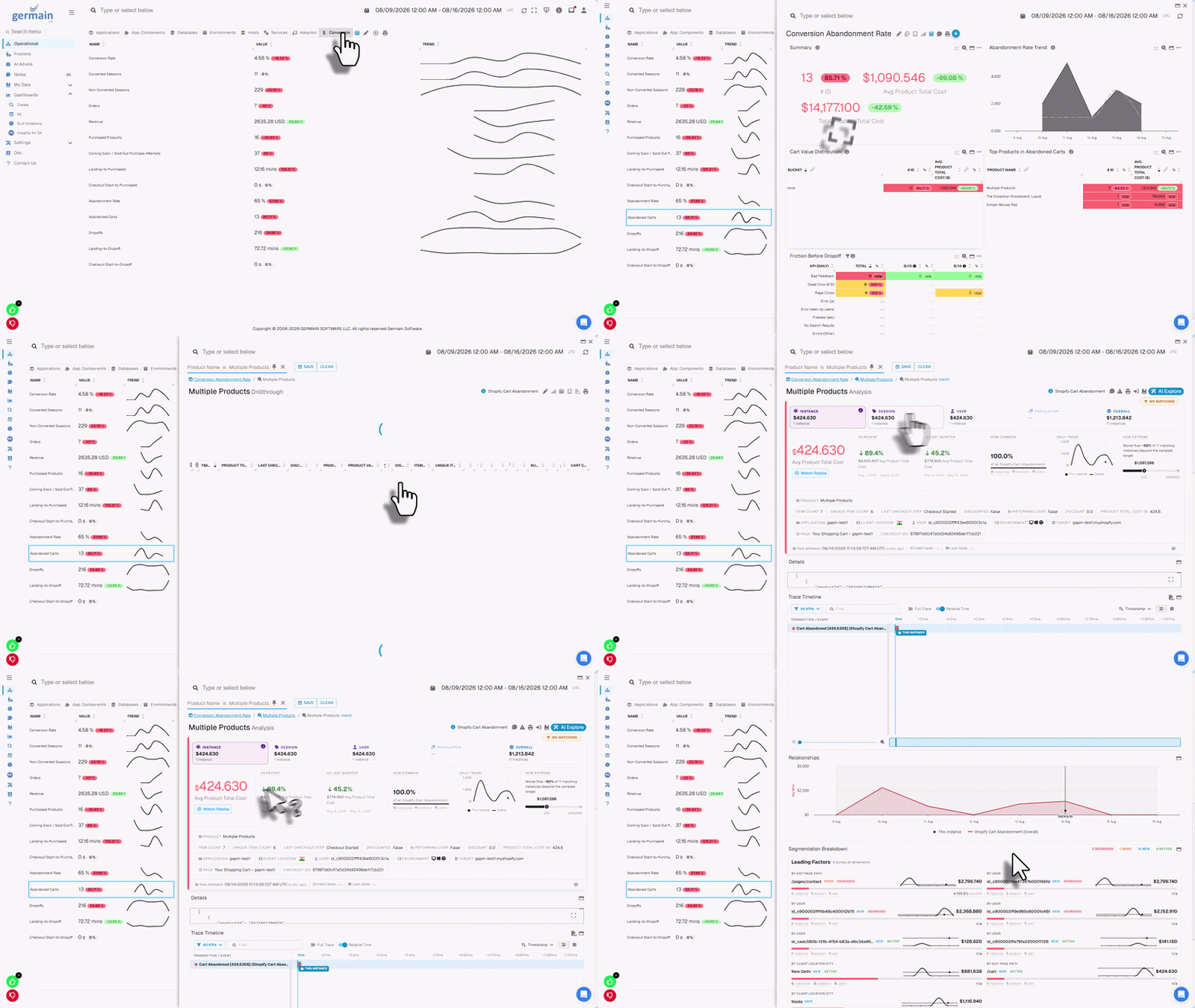
<Frame caption="Real-time conversion ops dashboard for SAP Commerce Cloud">
  <img src="https://mintcdn.com/germain-ux/Jw6D65yKWJ4U5yOS/images/03---Conversion-monitoring-(top-of-section).gif?s=f8a061adad40af34b3a24f504f3150a0" alt="Conversion ops dashboard for SAP Commerce Cloud" width="800" height="450" data-path="images/03---Conversion-monitoring-(top-of-section).gif" data-path="images/03---Conversion-monitoring-(top-of-section).gif" />
</Frame>

GermainUX can monitor conversion funnels such as:

<Steps>
  <Step title="Landing Page" />

  <Step title="Category Viewed" />

  <Step title="Product Viewed" />

  <Step title="Product Added to Cart" />

  <Step title="Cart Viewed" />

  <Step title="Checkout Started" />

  <Step title="Order Completed" />
</Steps>

Available conversion analysis can include:

<div className="gx-list">
  * Overall conversion rate
  * Product-view-to-cart rate
  * Search-to-product rate
  * Category-to-product rate
  * Cart-to-checkout rate
  * Checkout completion rate
</div>

<Accordion title="Show all 16">
  <div className="gx-list">
    * Cart abandonment
    * Checkout abandonment
    * Step conversion and drop-off
    * Conversion by product or category
    * Conversion by customer segment
    * Conversion by campaign or traffic source
    * Conversion by browser, device, or location
    * Errors associated with lost conversion
    * Performance associated with abandonment
    * Estimated revenue impact
  </div>
</Accordion>

<Info>
  Browser events describe the customer journey. SAP Commerce Cloud order data should remain the authoritative source for financial reconciliation.
</Info>

## Product-discovery analysis

GermainUX can help identify:

<div className="gx-list">
  * Searches returning no results
  * Searches that do not lead to a product
  * Categories that do not lead to product views
  * Products viewed but not added to the cart
  * Sold-out product encounters
</div>

<Accordion title="Show all 9">
  <div className="gx-list">
    * Ineffective filtering or sorting
    * Repeated searches
    * Frustrating product-navigation paths
    * Products associated with errors or slow performance
  </div>
</Accordion>

<Note>
  Custom events may be required for storefront-specific controls and outcomes.
</Note>

## Cart and checkout analysis

GermainUX can analyze:

<div className="gx-list">
  * Products added to and removed from the cart
  * Cart value and quantity, when approved and available
  * Cart abandonment
  * Checkout entry
  * Checkout progression
  * Step duration
</div>

<Accordion title="Show all 12">
  <div className="gx-list">
    * Checkout validation
    * Payment submission events
    * Checkout failures
    * Checkout completion
    * Third-party service failures
    * Customer behavior preceding abandonment
  </div>
</Accordion>

<Frame caption="Cart and checkout analysis">
  <img src="https://mintcdn.com/germain-ux/Jw6D65yKWJ4U5yOS/images/04---Cart-and-checkout-analysis-(after-the-Show-all-list).png?fit=max&auto=format&n=Jw6D65yKWJ4U5yOS&q=85&s=2d6f8c21ebf29dc5692477a636810321" alt="Cart and checkout analysis dashboard" width="1059" height="515" data-path="images/04---Cart-and-checkout-analysis-(after-the-Show-all-list).png" data-path="images/04---Cart-and-checkout-analysis-(after-the-Show-all-list).png" />
</Frame>

Keep these outcomes separate:

| Outcome | Meaning |
| - | - |
| <Badge color="red">User-facing application error</Badge> | Software failure visible to the customer |
| <Badge color="orange">Silent application error</Badge> | Software failure not shown to the customer |
| <Badge color="blue">User validation</Badge> | Expected feedback preventing invalid input |
| <Badge color="purple">Payment decline</Badge> | Payment rejected without evidence of a software malfunction |
| <Badge color="gray">Abandonment</Badge> | Customer leaves a monitored journey before completing it |
| <Badge color="gray">Monitoring gap</Badge> | One or more journey steps are not observable |

## Customer-feedback monitoring

The GermainUX feedback popup can collect customer feedback directly from a monitored SAP Commerce Cloud storefront. Feedback can be correlated with:

<div className="gx-list">
  * Customer session
  * Page
  * Product or category
  * Cart or checkout stage
  * Browser and device
</div>

<Accordion title="Show all 9">
  <div className="gx-list">
    * Error
    * Performance
    * Conversion outcome
    * Session Replay
  </div>
</Accordion>

This enables teams to understand both what the customer reported and what occurred before the feedback was submitted.

<Note>
  The popup supports NPS only when configured with the appropriate recommendation scale and scoring method.
</Note>

<Frame caption="Allow SAP users to provide feedback, understand the context, and act on it">
  <img src="https://mintcdn.com/germain-ux/Jw6D65yKWJ4U5yOS/images/05---Customer-feedback-monitoring-(end-of-section).png?fit=max&auto=format&n=Jw6D65yKWJ4U5yOS&q=85&s=38424d5f3983a1ee3ca28b25f3436292" alt="Customer feedback correlated with session context" width="896" height="240" data-path="images/05---Customer-feedback-monitoring-(end-of-section).png" data-path="images/05---Customer-feedback-monitoring-(end-of-section).png" />
</Frame>

## Heatmaps and behavioral analysis

For supported browser pages, GermainUX can provide:

<div className="gx-list">
  * Click heatmaps
  * Error-click heatmaps
  * Rage-click heatmaps
  * Dead-click heatmaps
  * Mouse-movement heatmaps
  * Scroll heatmaps
</div>

Heatmaps help teams identify:

<div className="gx-list">
  * Elements customers interact with most
  * Controls that appear interactive but do nothing
  * Repeated frustrated interactions
  * Important content customers do not reach
  * Layouts that create unnecessary friction
  * Differences across devices or customer segments
</div>

## Business-process monitoring

GermainUX can construct SAP business processes from events collected through RUM JS, the Engine, synthetic monitoring, or custom integrations.

<Frame caption="Track and improve ineffective processes">
  <img src="https://mintcdn.com/germain-ux/Jw6D65yKWJ4U5yOS/images/06---Business-process-monitoring-(after-intro-paragraph).jpg?fit=max&auto=format&n=Jw6D65yKWJ4U5yOS&q=85&s=6c1d0ad29ec844b051bc828395b8e4e1" alt="Business process tracking in GermainUX" width="1216" height="356" data-path="images/06---Business-process-monitoring-(after-intro-paragraph).jpg" data-path="images/06---Business-process-monitoring-(after-intro-paragraph).jpg" />
</Frame>

### Commerce processes

<div className="gx-list">
  * Product discovery
  * Search to product
  * Product to cart
  * Cart to checkout
  * Checkout to order
</div>

<Accordion title="Show all 9">
  <div className="gx-list">
    * Customer registration
    * Login and password recovery
    * Return request
    * Support or chat journey
  </div>
</Accordion>

<Frame caption="Analyze business processes and frictions at scale">
  <img src="https://mintcdn.com/germain-ux/Jw6D65yKWJ4U5yOS/images/07---Business-process-monitoring-(after-Commerce-processes).jpg?fit=max&auto=format&n=Jw6D65yKWJ4U5yOS&q=85&s=98f185b9d7e910efd43615694111b572" alt="Business process analysis at scale" width="1190" height="346" data-path="images/07---Business-process-monitoring-(after-Commerce-processes).jpg" data-path="images/07---Business-process-monitoring-(after-Commerce-processes).jpg" />
</Frame>

### Enterprise SAP processes

<div className="gx-list">
  * Purchase requisition
  * Purchase-order approval
  * Invoice approval
  * Sales-order entry
  * Expense submission
  * Material lookup
  * Employee self-service
</div>

For each process, configure:

<div className="gx-list">
  * Start event
  * Completion event
  * Steps
  * Optional and alternative paths
  * Failure conditions
</div>

<Accordion title="Show all 9">
  <div className="gx-list">
    * Abandonment timeout
    * Expected duration
    * Correlation rules
    * Application and environment
  </div>
</Accordion>

GermainUX can then identify:

<div className="gx-list">
  * Completion
  * Abandonment
  * Step drop-off
  * Slow steps
  * Rework
</div>

<Accordion title="Show all 9">
  <div className="gx-list">
    * Repeated actions
    * Application errors
    * Process overruns
    * Estimated lost productivity
  </div>
</Accordion>

<Note>
  Process analysis depends on the events available to GermainUX. Undocumented or inaccessible SAP workflow steps are not automatically visible.
</Note>

<Frame caption="Analyze every step of a process">
  <img src="https://mintcdn.com/germain-ux/Jw6D65yKWJ4U5yOS/images/08---Business-process-monitoring-(end-of-section).png?fit=max&auto=format&n=Jw6D65yKWJ4U5yOS&q=85&s=0ea91d87aad7d2f59a047eac50ed3b80" alt="Step-by-step process analysis" width="853" height="182" data-path="images/08---Business-process-monitoring-(end-of-section).png" data-path="images/08---Business-process-monitoring-(end-of-section).png" />
</Frame>

## Browser-side JavaScript diagnostics

The JS Profiler can provide deeper browser-side information about:

<div className="gx-list">
  * JavaScript execution
  * Function and call-stack activity
  * Long-running browser operations
  * Browser freezes
  * Client-side errors
  * Network activity
  * Frontend-framework behavior
  * Third-party scripts
</div>

This can be used for SAP Commerce Cloud storefronts, SAP Fiori, SAPUI5, and other compatible browser interfaces.

<Warning>
  The JS Profiler does not profile ABAP.
</Warning>

<Frame caption="Browser-side JavaScript diagnostics">
  <img src="https://mintcdn.com/germain-ux/Jw6D65yKWJ4U5yOS/images/09---Browser-side-JavaScript-diagnostics-(end-of-section).png?fit=max&auto=format&n=Jw6D65yKWJ4U5yOS&q=85&s=e80ca3e3258d0bd72cc86e7b0f377532" alt="Browser-side JavaScript diagnostics view" width="744" height="407" data-path="images/09---Browser-side-JavaScript-diagnostics-(end-of-section).png" data-path="images/09---Browser-side-JavaScript-diagnostics-(end-of-section).png" />
</Frame>

## SAP Commerce Cloud Java monitoring

SAP Commerce Cloud uses Java-based server components. The GermainUX Code Profiler may monitor those components when:

<div className="gx-list">
  * The Java runtime and application server are supported.
  * The organization controls the runtime.
  * Profiler-agent installation is permitted.
  * The deployment is approved.
  * Required network communication is available.
</div>

Potential capabilities include:

<div className="gx-list">
  * Java transaction tracing
  * Method-level performance
  * Exceptions
  * Outbound calls
  * Database-call correlation
  * Time spent in supported Java components
</div>

<Warning>
  In SAP-managed Commerce Cloud environments, server-agent deployment may be restricted. Confirm access before claiming Java-level monitoring.
</Warning>

## HTTP, API, and integration monitoring

The GermainUX Engine can monitor reachable SAP-related endpoints for:

<div className="gx-list">
  * Availability
  * Response time
  * HTTP status
  * Timeout
  * Authentication failure
  * Expected response content
  * Configured functional success
</div>

Potential targets include:

<div className="gx-list">
  * SAP Commerce Cloud OCC APIs
  * REST endpoints
  * OData services
  * SOAP services
  * Payment integrations
</div>

<Accordion title="Show all 10">
  <div className="gx-list">
    * Search services
    * Inventory services
    * CRM or ERP integrations
    * Shipping and tax services
    * Customer-identity services
  </div>
</Accordion>

<Note>
  Each endpoint requires explicit configuration. This is endpoint monitoring, not automatic visibility into every internal SAP service.
</Note>

## Log and file monitoring

The Engine can monitor accessible SAP-related logs and text files when the format is supported or an appropriate parser is configured. Potential sources include:

<div className="gx-list">
  * Commerce application logs
  * Web-server logs
  * Integration logs
  * Job logs
  * Security logs
  * Exported diagnostic files
</div>

For each source, configure:

<div className="gx-list">
  * Path and pattern
  * Encoding
  * Timestamp
  * Multiline handling
  * Rotation
  * Severity
  * Application and environment
  * Privacy rules
</div>

<Note>
  Managed cloud environments may restrict direct access to files and servers.
</Note>

## Server and database monitoring

For customer-controlled environments, the Engine can monitor supported:

<div className="gx-list">
  * Operating-system hosts
  * Processes and services
  * CPU, memory, and disk
  * Network availability
  * Databases
</div>

<Accordion title="Show all 10">
  <div className="gx-list">
    * Connections
    * Capacity
    * Locks
    * Queries
    * Errors
  </div>
</Accordion>

Compatibility depends on the operating system, database technology, GermainUX version, permissions, and network access.

<Warning>
  Do not claim direct SAP HANA monitoring unless a compatible monitor has been validated for the installed GermainUX version.
</Warning>

## Synthetic monitoring

Use the RPA Bot Recorder to create Selenium scenarios for supported browser-based SAP applications.

### SAP Commerce Cloud scenarios

<Steps>
  <Step title="Open the storefront" />

  <Step title="Search for a product" />

  <Step title="Open a product page" />

  <Step title="Add a product to the cart" />

  <Step title="View the cart" />

  <Step title="Start checkout" />

  <Step title="Validate price or availability" />

  <Step title="Sign in" />

  <Step title="Confirm that a critical integration works" />
</Steps>

### Enterprise SAP scenarios

<Steps>
  <Step title="Open the login page" />

  <Step title="Sign in" />

  <Step title="Open the Fiori launchpad" />

  <Step title="Launch an application" />

  <Step title="Perform a read-only lookup" />

  <Step title="Validate an expected result" />

  <Step title="Sign out" />
</Steps>

<Info>
  Synthetic monitoring requires dedicated credentials, safe test data, explicit validations, execution infrastructure, scheduling, and alerts.
</Info>

## Error monitoring

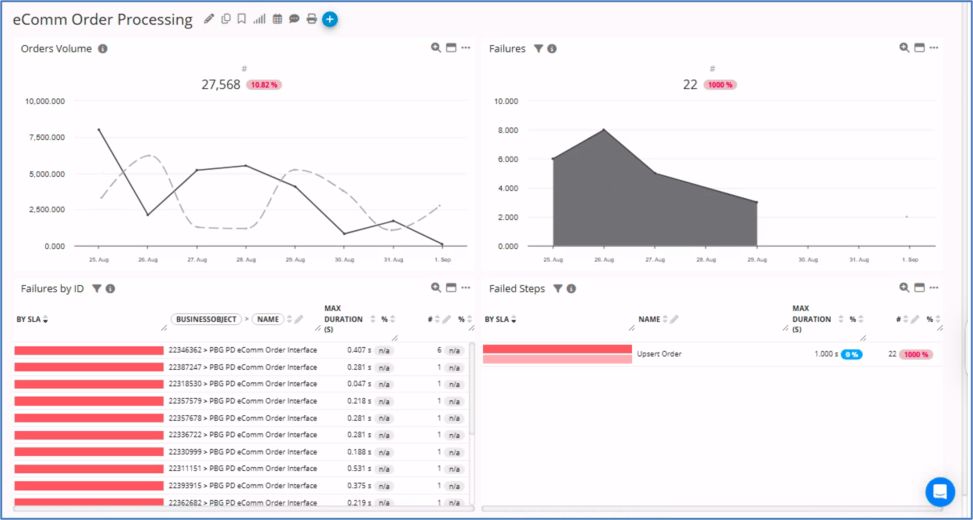
<Frame caption="Detect and fix SAP order failures in real time">
  <img src="https://mintcdn.com/germain-ux/Jw6D65yKWJ4U5yOS/images/10-detect-and-fix-sap-order-failures.png?fit=max&auto=format&n=Jw6D65yKWJ4U5yOS&q=85&s=b0cf04079e3b3134ddfdb63ad2340ecc" alt="SAP order failure detection in GermainUX" width="973" height="520" data-path="images/10-detect-and-fix-sap-order-failures.png" data-path="images/10-detect-and-fix-sap-order-failures.png" />
</Frame>

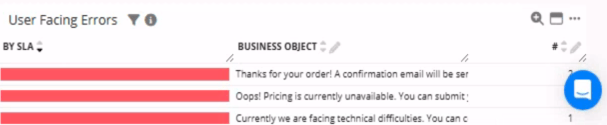
<Frame caption="Diagnose and resolve SAP user errors">
  <img src="https://mintcdn.com/germain-ux/Jw6D65yKWJ4U5yOS/images/11-diagnose-and-resolve-sap-user-error.png?fit=max&auto=format&n=Jw6D65yKWJ4U5yOS&q=85&s=0d046f572eb073b213e9be0ddf6f7c5b" alt="SAP user error diagnosis in GermainUX" width="607" height="125" data-path="images/11-diagnose-and-resolve-sap-user-error.png" data-path="images/11-diagnose-and-resolve-sap-user-error.png" />
</Frame>

GermainUX can collect errors from configured:

<div className="gx-list">
  * Browser events
  * JavaScript
  * Network requests
  * HTTP checks
  * Application logs
</div>

<Accordion title="Show all 9">
  <div className="gx-list">
    * Java exceptions, when Code Profiler is available
    * Integrations
    * Supported databases
    * Synthetic scenarios
  </div>
</Accordion>

Use these classifications:

| Classification | Definition |
| - | - |
| <Badge color="red">User-facing application error</Badge> | Software failure visible to the user |
| <Badge color="orange">Silent application error</Badge> | Software failure not visible to the user |
| <Badge color="blue">User validation</Badge> | Expected feedback preventing invalid input |
| <Badge color="gray">Technical event</Badge> | Condition not yet confirmed as a software failure |
| <Badge color="purple">Business-process failure</Badge> | Expected business outcome was not achieved |

## Outlier detection and analysis

GermainUX can apply outlier detection to collected SAP-related KPIs, including:

<div className="gx-list">
  * User-action duration
  * Page duration
  * Checkout duration
  * Business-process duration
  * HTTP response time
  * Error volume
  * Host metrics
  * Supported database metrics
</div>

<Info>
  Outlier detection operates on data already collected by GermainUX.
</Info>

## Alerts, reports, and automation

GermainUX can:

<div className="gx-list">
  * Alert on configured KPI
</div>

<Note>
  Compliance depends on correct configuration, validation, access control, and operating procedures.
</Note>

## Recommended dashboards

Depending on the deployed monitoring, dashboards can cover:

<div className="gx-list">
  * SAP Commerce Cloud conversion
  * Product discovery
  * Cart and checkout
  * Customer experience
  * Customer feedback
  * Application adoption
</div>

<Accordion title="Show all 13">
  <div className="gx-list">
    * User productivity
    * Business-process efficiency
    * Browser performance
    * Error impact
    * HTTP and integration availability
    * Synthetic monitoring
    * Server and supported database health
  </div>
</Accordion>

<Tip>
  Every dashboard KPI should be backed by an active and validated data source.
</Tip>

## Additional Resources

<CardGroup cols={3}>
  <Card title="Deploy" icon="rocket" href="/main/deploy-monitoring-for-sap">
    Monitoring or automation for SAP Commerce Cloud.
  </Card>

  <Card title="Configure" icon="gear" href="/main/configure-monitoring-for-sap">
    Monitoring or automation for SAP Commerce Cloud.
  </Card>

  <Card title="AI" icon="sparkles" href="/main/ai-driven-insights">
    Insights & Recommendations
  </Card>

  <Card title="Analytics" icon="chart-simple" href="/main/analytics">
    More Analytics Features
  </Card>

  <Card title="Automation" icon="robot" href="/main/automation">
    More Automation Features
  </Card>

  <Card title="Dashboard & Reports" icon="table-columns" href="/main/dashboard-and-report">
    Dashboard & Reports
  </Card>
</CardGroup>

## Get Help

<CardGroup cols={2}>
  <Card title="Contact GermainUX Support" icon="headset" href="/main/support">
    The GermainUX Team can help you set this up.
  </Card>

  <Card title="Can't find what you need?" icon="magnifying-glass">
    Search all GermainUX docs with **Ctrl + K**, or use the feedback buttons at the bottom of this page to tell us what is missing.
  </Card>
</CardGroup>

<GxFooter />

<GxStyle />

<style>
  {`
                                                              .gx-meta { display:flex; flex-direction:column; gap:10px; margin:22px 0 6px; padding:16px 18px; border:1px solid rgba(15,23,42,.08); border-radius:16px; background:rgba(46,125,242,.035); font-size:13.5px; }
                                                              .dark .gx-meta { border-color: rgba(255,255,255,.08); background:rgba(91,156,255,.06); }
                                                              .gx-meta-row { display:flex; flex-wrap:wrap; align-items:center; gap:6px; }
                                                              .gx-meta-label { width:96px; flex:none; color:#64748b; }
                                                              .dark .gx-meta-label { color:#8391a7; }
                                                              .gx-list ul { columns:2; column-gap:24px; list-style:none !important; padding-left:0 !important; margin:14px 0 0 !important; }
                                                              .gx-list li { break-inside:avoid; position:relative; padding:4px 0 4px 22px !important; margin:0 !important; font-size:14.5px; }
                                                              .gx-list li::marker { content:""; }
                                                              .gx-list li::before { content:""; position:absolute; left:3px; top:13px; width:7px; height:7px; border-radius:50%; background:#2E7DF2; opacity:.75; }
                                                              .dark .gx-list li::before { background:#5B9CFF; }
                                                              .gx-fine { margin-top:56px; padding-top:20px; border-top:1px solid rgba(15,23,42,.08); font-size:13px; color:#64748b; }
                                    .dark .gx-fine { border-top-color:rgba(255,255,255,.08); color:#94a3b8; }
                                    .dark .gx-meta-label { color:#94a3b8; }
                                                              @media (max-width: 820px) { .gx-list ul { columns:1; } }
                                                              `}
</style>

<style>
  {`
                                  /* GermainUX brand layer */
                                  .eyebrow { font-size:13px !important; font-weight:700 !important; letter-spacing:.12em !important; text-transform:uppercase; color:#2E7DF2 !important; display:inline-flex; align-items:center; gap:8px; padding:4px 12px; border-radius:999px; background:rgba(46,125,242,.10); border:1px solid rgba(46,125,242,.25); height:auto !important; margin-bottom:6px; }
                                  .dark .eyebrow { color:#8DB8FF !important; background:rgba(91,156,255,.12); border-color:rgba(91,156,255,.30); }
                                  #page-title { letter-spacing:-.02em; }
                                  .dark #page-title { background:linear-gradient(90deg,#FFFFFF 0%,#BFD6FF 100%); -webkit-background-clip:text; background-clip:text; -webkit-text-fill-color:transparent; }
                                  .mdx-content h2, mdx-content h2 { position:relative; padding-left:16px; }
                                  .mdx-content h2::before, mdx-content h2::before { content:""; position:absolute; left:0; top:.2em; bottom:.2em; width:4px; border-radius:4px; background:linear-gradient(180deg,#2E7DF2,#5B9CFF); }
                                  .dark .gx-meta { background:linear-gradient(135deg,rgba(46,125,242,.16),rgba(0,17,42,.4)); border-color:rgba(91,156,255,.22); }
                                  .gx-meta code { border-color:rgba(46,125,242,.25) !important; color:#1A5FC8 !important; background:rgba(46,125,242,.08) !important; }
                                  .dark .gx-meta code { color:#BFD6FF !important; background:rgba(91,156,255,.12) !important; border-color:rgba(91,156,255,.28) !important; }
                                  .dark table th { color:#BFD6FF; }
                                  .dark table td:first-child { color:#FFFFFF; font-weight:500; }
                                  .gx-noop { }
                                `}
</style>


This documentation is built and hosted on [Mintlify](https://mintlify.com), a developer documentation platform.