

Message Count Monitoring
Queued mail volume checks
Message Age Monitoring
How long mail has waited
Monitor Email-Driven Integrations
Detect mailbox backlogs early
How It Works
Step-by-step monitoring flow
GermainUX provides real-time Observability, Analytics, Alerting, and Automation for POP3 mailboxes.
What to monitor
Monitor the number and age of messages waiting in a mailbox to detect when an email-driven application, service, or integration is no longer processing messages as expected.Visibility scope
Message Count Monitoring
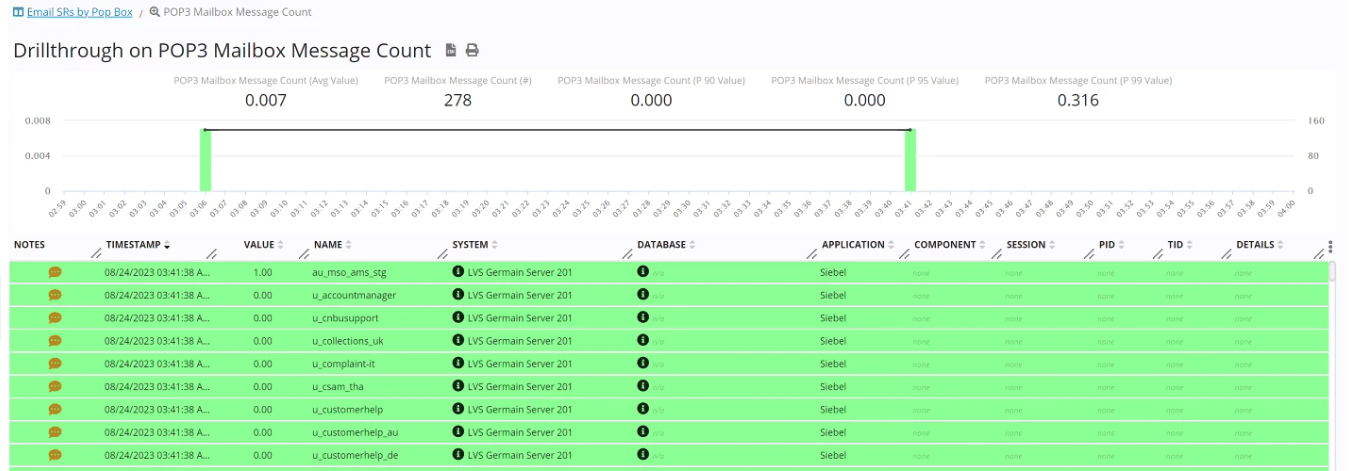
Monitor the number of messages waiting in a POP3 mailbox. GermainUX can help identify:- Unexpected message accumulation
- Growing mailbox backlogs
- Sudden increases in incoming messages
- Mailboxes that are not being processed
- Changes in message-processing volume
- Mailboxes remaining empty when messages are expected
Message Age Monitoring
When the mailbox count exceeds a configured threshold, GermainUX can retrieve message timestamps to determine how long messages have been waiting. Analyze:- Age of the oldest message
- How long messages remain unprocessed
- When a backlog started
- Whether the backlog is temporary or persistent
- Whether processing has resumed
Mailbox Availability
Monitor whether GermainUX can successfully access the POP3 mailbox. Detect conditions such as:- POP3 server unavailable
- Network connection failure
- Authentication failure
- Connection timeout
- TLS or certificate issue
- Unexpected POP3 response
- Monitoring-script failure
Monitor Email-Driven Integrations
POP3 monitoring is particularly useful for applications and integrations that process incoming email. For example:EmailPOP3 MailboxIntegrationApplication
If messages begin accumulating in the mailbox, GermainUX can detect the backlog and help determine whether the consuming integration or application has stopped processing messages.
Common use cases include:
- Email-driven integrations
- Customer-service mailboxes
- Order-processing mailboxes
- Automated document processing
- Notification mailboxes
- Batch-processing mailboxes
How It Works
POP3 monitoring follows this flow:GermainUX EnginePOP3 MailboxMonitoring ResultKPI
The GermainUX Engine executes the configured monitoring script.
The script:
1
Connects to the POP3 mailbox
2
Retrieves the number of waiting messages
3
Retrieves message timestamps when configured conditions are met
4
Returns the monitoring results to GermainUX
5
GermainUX converts the results into monitoring facts and KPIs
KPIs & Analytics
POP3 monitoring can provide KPIs such as:- POP3 Mailbox Message Count
- POP3 Mailbox Message
- POP3 Mailbox Availability
- POP3 Mailbox Error
- Current message count
- Maximum message count
- Average message count
- Message age
- Age of oldest message
- Availability
- Error count
Detect Processing Issues
GermainUX can detect conditions such as:- Message count exceeds threshold
- Messages remain unprocessed too long
- Backlog continues to grow
- Mailbox becomes unavailable
- Authentication repeatedly fails
- Expected messages stop arriving
- Mailbox monitoring stops executing
Root Cause & Correlation
Correlate mailbox conditions with the application or integration responsible for processing the messages. For example:Mailbox BacklogIntegrationApplication Error
or:
Mailbox BacklogConsumer ProcessServer
or:
Mailbox UnavailableNetworkPOP3 Server
POP3 telemetry can be correlated with application, integration, log, server, database, and network telemetry monitored by GermainUX.
Real-Time Dashboards & Automated Reports
Create dashboards and automated reports for:- Message count
- Message age
- Mailbox availability
- Backlog trends
- Errors
- SLA violations
- Mailbox comparisons
- Integration health
Alerts & SLA Monitoring
Configure SLAs and alerts for conditions requiring attention. For example: Message Count > Threshold Oldest Message Age > Threshold Mailbox Availability = Unavailable Backlog Continues to Grow GermainUX can notify the appropriate operational team when a mailbox condition exceeds its expected service level.Automation
POP3 mailbox conditions can trigger GermainUX automation. For example:MonitorDetectAnalyzeAlertAutomate
Depending on the use case and authorization, automation can include:
- Notifications
- Reports
- Diagnostic scripts
- Operational workflows
- Controlled remediation actions
Security & Privacy
POP3 mailboxes may contain sensitive communications. GermainUX monitoring should use:- Dedicated least-privileged mailbox accounts
- Protected credentials
- Encrypted POP3S connections where supported
- Restricted monitoring-data access
Deployment
POP3 monitoring is executed by the GermainUX Engine using a configured monitoring script and rule. See Deploy Monitoring for POP3 Mailbox.Get More Information
POP3 monitoring can be customized according to mailbox volume, processing expectations, SLAs, applications, integrations, and operational requirements. GermainUX can help determine which monitoring, analytics and automation capabilities are appropriate for your Pop3 Mailbox environment. Contact GermainUX Support.Get Help
Contact GermainUX Support
The GermainUX team helps you get up and running faster, empower your team, turn data into actionable insights, and optimize performance to deliver measurable business outcomes.
Can't find what you need?
Search all GermainUX docs with Ctrl + K, or use the feedback buttons at the bottom of this page to tell us what is missing.
The content of this document is proprietary to GERMAIN SOFTWARE.