
🚀 Deploy Monitoring for Node.js
Deploy GermainUX monitoring into a Node.js application to capture application performance, HTTP transactions, errors, event-loop latency, resource utilization, and other Node.js telemetry.
📋 Requirements
Before deployment, verify:
-
Node.js v14 or later
-
npm or Yarn package management
-
Network connectivity from the Node.js application to the GermainUX environment
The Node.js application must be able to send monitoring telemetry to the configured GermainUX server.
🚀 1. Start the Node.js Wizard
In Germain Workspace, navigate to:
Left Menu → Wizards → NodeJS
Start the Node.js monitoring deployment Wizard.
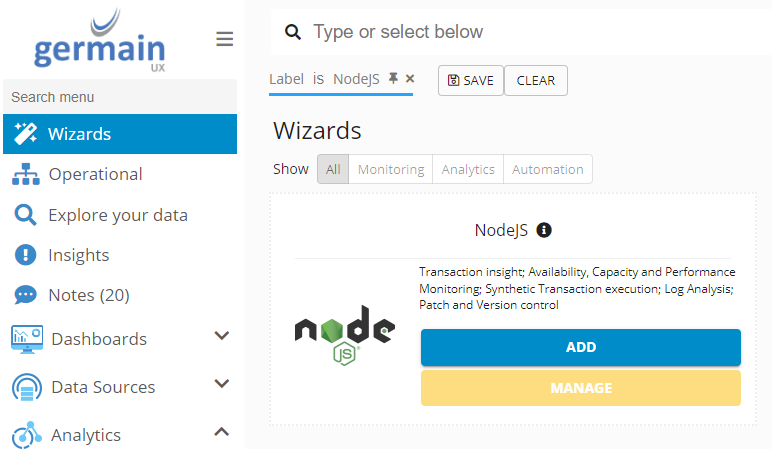
🔧 2. Configure the Monitored Application
Configure the Node.js environment you want to monitor.
Define:
-
Monitored Server
-
Application
-
Name
Use consistent application naming so collected Node.js telemetry can be correctly associated with the application in GermainUX.
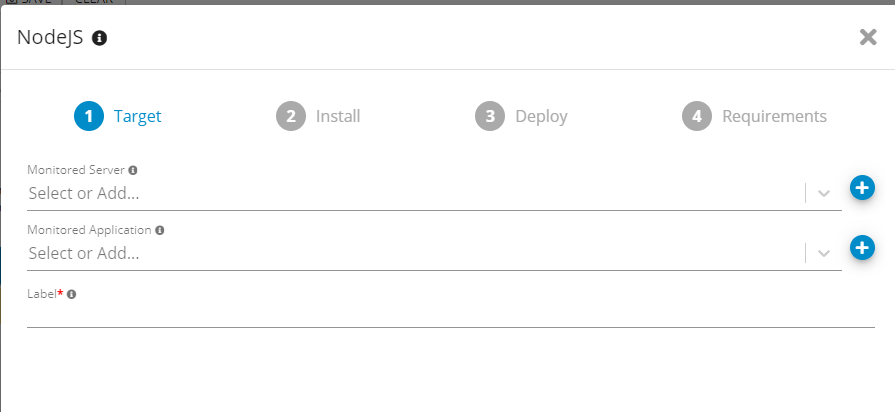
📦 3. Install the GermainUX Node.js Package
The GermainUX Node.js monitoring package is:
@germainapm/nodejs-monitoring
npm
Install using:
npm i --save @germainapm/nodejs-monitoring
Yarn
Install using:
yarn add @germainapm/nodejs-monitoring
⚙️ 4. Initialize GermainUX Monitoring
Initialize GermainUX in the main JavaScript file used to start the Node.js application, such as:
server.js
RequireJS
const GermainAPM = require('@germainapm/nodejs-monitoring');

const config = GermainAPM.getDefaultConfiguration('https://GERMAIN_APM_SERVER/');
const apm = new GermainAPM(config);
apm.start();
ES6
import GermainAPM from '@germainapm/nodejs-monitoring';

const config = GermainAPM.getDefaultConfiguration('https://GERMAIN_APM_SERVER/');
const apm = new GermainAPM(config);
apm.start();
Replace GERMAIN_APM_SERVER with the GermainUX environment receiving the monitoring telemetry.
For the simplest deployment, only the GermainUX server URL is required. Standard monitoring capabilities are automatically configured.
🏷️ 5. Identify the Application
Optionally specify the application name when creating the default configuration:
const config = GermainAPM.getDefaultConfiguration(
    'https://GERMAIN_APM_SERVER/',
    'APP_NAME'
);
Application and component can also be configured separately:
config.defaults.application = {
    name: 'APP_NAME',
    component: 'APP_COMPONENT'
};
Use consistent application and component names across environments.
🔐 6. Review Data Collection & Privacy
Before production deployment, review the information collected from the Node.js application.
GermainUX supports:
-
Masking
-
Anonymization
-
Exclusion
Configure exclusions for sensitive information before enabling monitoring broadly in production.
Pay particular attention to information associated with:
-
HTTP requests
-
Request bodies
-
Session identifiers
-
User information
-
Authentication information
-
Application-specific sensitive data
🔄 7. Restart the Node.js Application
Restart the application after installing and initializing the GermainUX monitoring package.
GermainUX monitoring starts when the application initializes the package and calls:
apm.start()
✅ 8. Validate the Deployment
Execute representative Node.js application activity.
For example:
Incoming HTTP Request → Node.js Processing → Outgoing HTTP Request → Response
Verify that GermainUX receives the expected telemetry, such as:
-
HTTP transactions
-
Errors and warnings
-
Event-loop latency
-
Node.js process resources
-
OS resources
-
Application startup
-
Application events
Also verify that the application is associated with the correct server and application in GermainUX.
📊 Next Steps
Once Node.js monitoring is operational, configure:
-
Monitoring frequency
-
Asynchronous correlation
-
Data distribution frequency
-
Error monitoring
-
HTTP monitoring
-
Event-loop latency
-
Transactions
-
Process and OS resources
-
Privacy and exclusions
See Configure Monitoring for Node.js for detailed configuration.
ℹ️ Get More Information
NodeJS environments can vary significantly depending on storefront customization, extensions, integrations, infrastructure, and security requirements.
The GermainUX team can help configure the appropriate monitoring scope, privacy controls, analytics, alerts, and automation for your NodeJS environment.
Please contact us for any help.
Component: Engine, JS Profiler, RPA Bot Recorder, RUM JS
Feature Availability: 2017.1 or later