

Review each updated object
Audit changed upgrade objects
Decide how to handle each object
Keep, merge or restore
Test the customizations
Validate with real workflows
Complete the upgrade
Checklist before production
Customization Validation - GermainUX
When to perform this validation
Validate customizations:- After every GermainUX upgrade
- After importing a new standard configuration package
- After restoring configuration from another environment
- Before promoting an upgraded environment to production
Before you begin
Confirm that:- The GermainUX upgrade completed successfully.
- Germain Enterprise and all required services are running.
- The Workspace is accessible.
- The new standard configuration was imported successfully.
- A backup of the pre-upgrade configuration is available.
- You have a record of customer-specific customizations.
- Your account has permission to review and modify configuration objects.
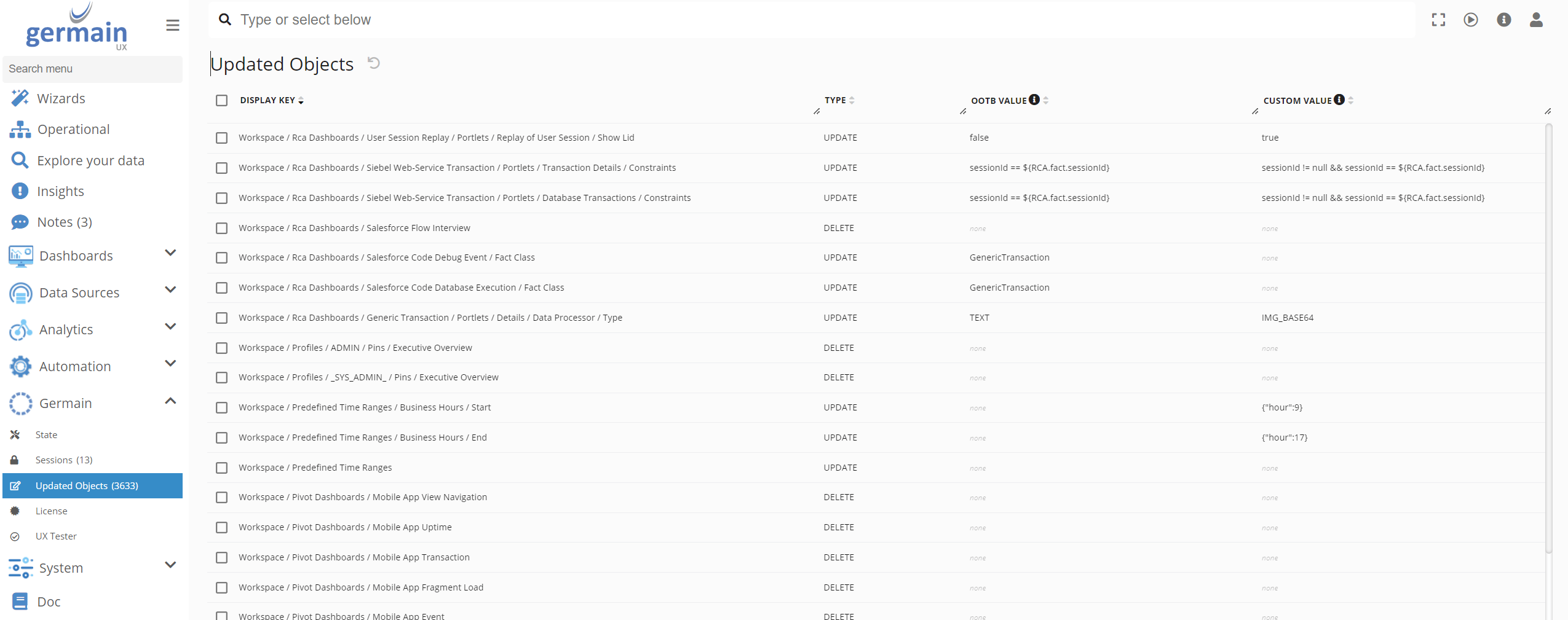
Open Updated Objects
1
Sign in to the GermainUX Workspace
2
Open the left navigation menu
3
Select Germain
4
Select Updated Objects
Review each updated object
For every object listed, determine:- Whether it is a standard GermainUX object or a customer-created object
- Whether the object was customized before the upgrade
- What changed in the new GermainUX version
- Whether the customization is still required
- Whether the customization conflicts with the updated standard configuration
- Whether the standard enhancement should be retained
- Whether the customized and standard changes must be merged
- Applications and data sources
- KPIs and measures
- Rules and SLAs
- Monitoring profiles
- Dashboards and portlets
- Alerts and reports
Show all 11
Show all 11
- Automated actions
- Scripts
- Data privacy and masking
- User roles and permissions
- Technology-specific integrations
Decide how to handle each object
An updated object generally requires one of the following actions:
Preserve a copy of the original and upgraded versions before manually merging configuration.
Test the customizations
After resolving the updated objects, validate the affected functionality. Confirm that:
Use representative test data and business workflows—not just confirmation that the configuration loads.
Review the logs
During validation, review the Germain Enterprise and GermainUX Service logs for:
An object may appear valid in the Workspace while still generating runtime errors.
Record the outcome
For each reviewed customization, document:
This record simplifies validation during future upgrades.
Complete the upgrade
Before promoting the upgraded environment to production, confirm that:
If an object cannot be reconciled safely, restore the previous configuration in the test environment and contact GermainUX Support before proceeding.
Get Help
Contact GermainUX Support
The GermainUX team helps you get up and running faster, empower your team, turn data into actionable insights, and optimize performance to deliver measurable business outcomes.
Can't find what you need?
Search all GermainUX docs with Ctrl + K, or use the feedback buttons at the bottom of this page to tell us what is missing.
The content of this document is proprietary to GERMAIN SOFTWARE.