

Observe & Analyze
Collect and correlate
Prioritize & Act
Focus and automate
Architecture
Three layers
Your Goals
Configured for you
Overview
GermainUX combines monitoring, analytics, AI, and automation to continuously understand and improve user experience, business workflows, application behavior, and technology performance. The platform follows a continuous operational model:ObserveAnalyzePrioritizeActValidate
You can start with a single application or use case and expand GermainUX as your requirements grow.
1. Observe
GermainUX collects the data required for your use case from sources such as:- Adoption
- APIs and services
- Application code
- Browser applications
- Business processes
- Cloud services
- Conversion
- Databases
Show all 15
Show all 15
- Logs and files
- Mobile applications
- Native Windows applications
- Networks
- Servers and operating systems
- Third-party platforms
- User sessions
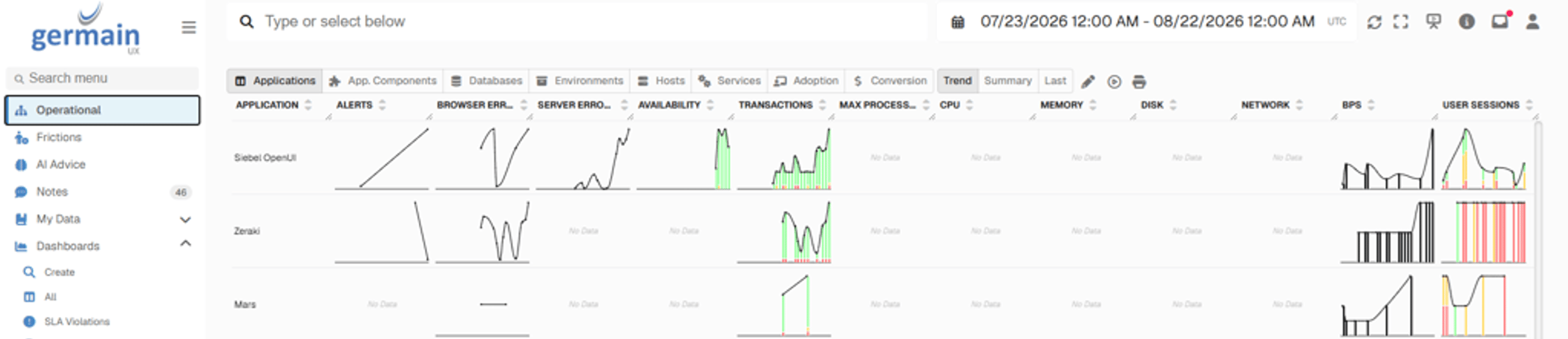
360 real-time view of technology, adoption, conversion - GermainUX
2. Analyze
GermainUX Enterprise continuously processes and correlates collected data. Analytics can identify:- Friction
- Errors
- Performance degradation
- Conversion issues
- Adoption barriers
- Productivity loss
Show all 11
Show all 11
- Process inefficiencies
- Anomalies
- Trends
- Relationships
- Root causes
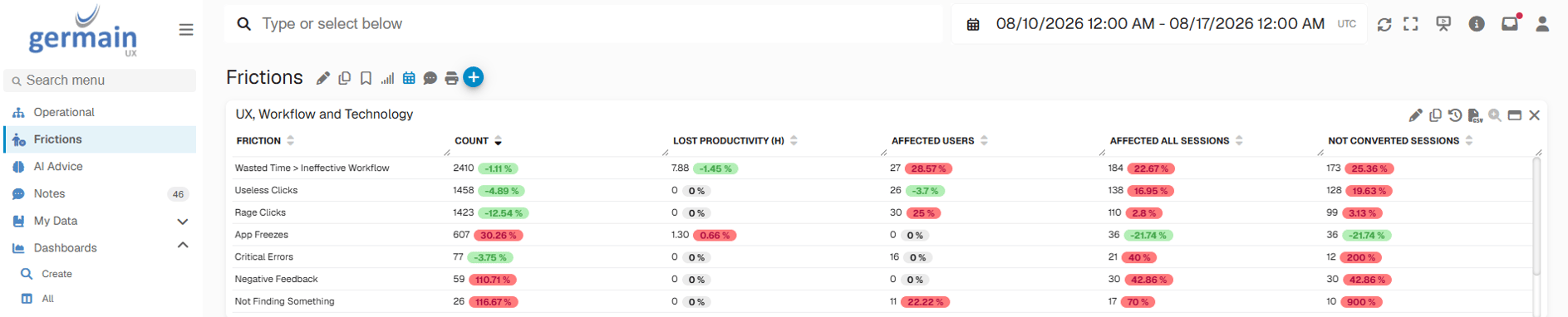
Friction View - GermainUX
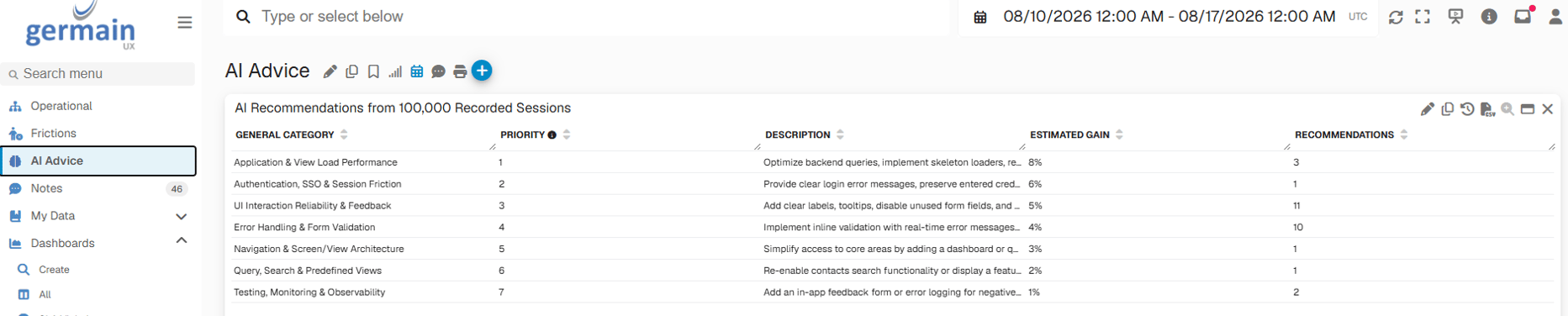
AI Advice - GermainUX
3. Prioritize
GermainUX connects technical and experience signals with their operational and business impact. Instead of prioritizing solely by technical severity, teams can consider:- How frequent and how many users are affected
- Which workflows are affected
- Converted or not
- Friction count
- Productivity Loss
- Technical severity
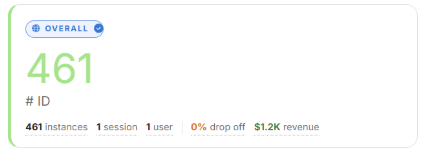
Issue Aggregate Impact Analysis - GermainUX
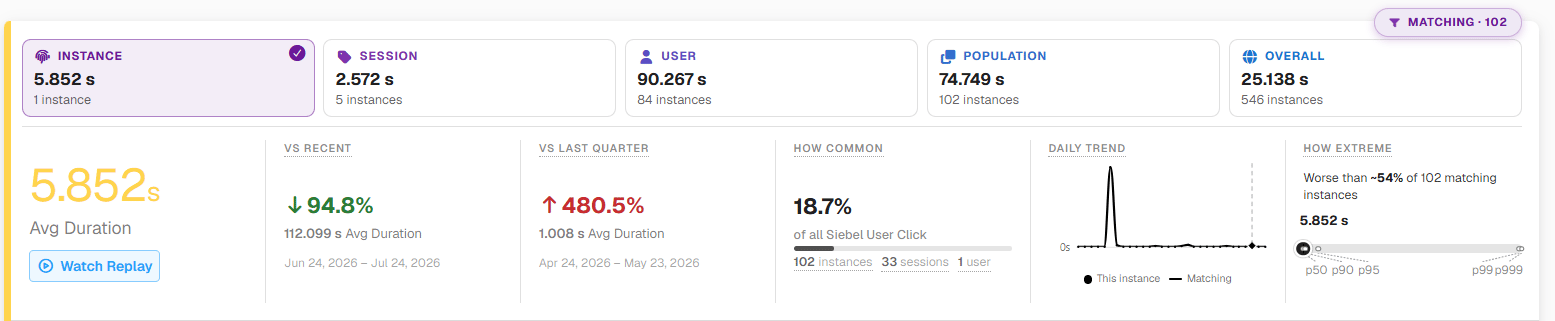
Issue Instance Impact Analysis - GermainUX
4. Act
GermainUX Automation can turn detected conditions and analytical findings into actions. Depending on the use case, GermainUX can:- Notify a team
- Send a report
- Create or update a ticket
- Call an API
- Execute a script
- Execute SQL
Show all 9
Show all 9
- Run an RPA workflow
- Execute a synthetic transaction
- Perform an approved remediation action
5. Validate
Monitoring continues after an action, release, configuration change, or remediation. Teams can validate whether:- The issue stopped occurring
- Performance improved
- User friction decreased
- Conversion improved
- Adoption improved
- Productivity improved
- A business process returned to expected behavior
Architecture
GermainUX consists of three primary layers: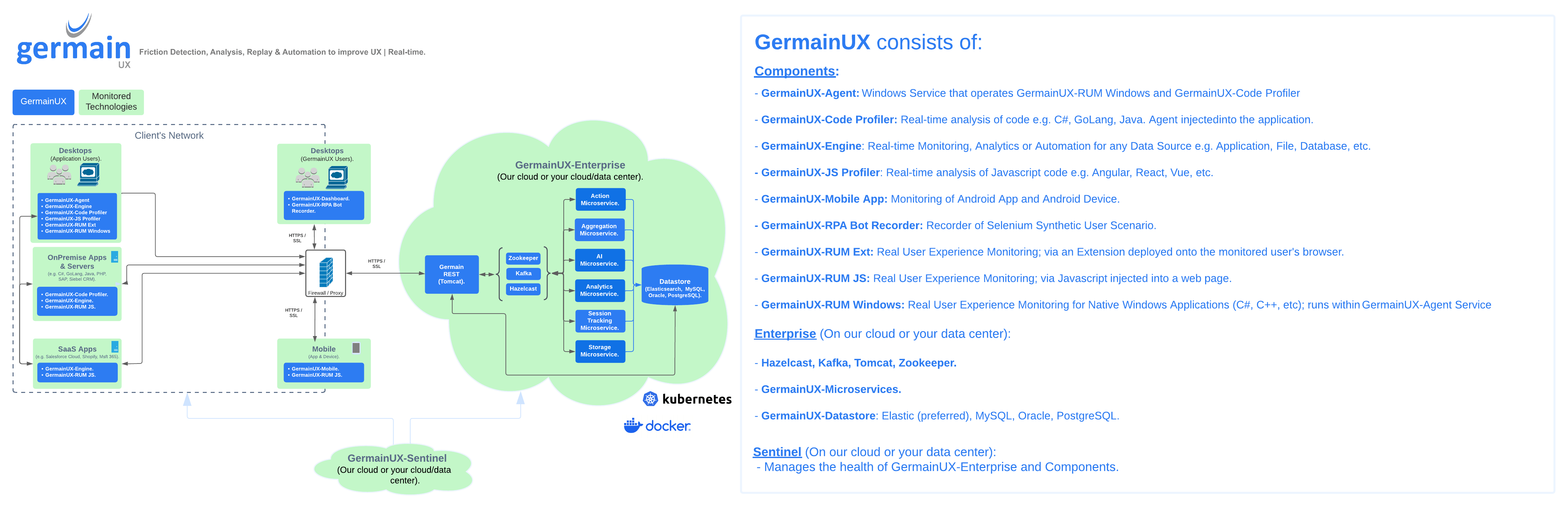
GermainUX architecture
Explore GermainUX Components
See every monitoring, execution, and platform component.
Cloud, On-Premise or Hybrid
GermainUX Enterprise can be deployed:- In GermainUX Cloud
- In your Data Center
- In your Cloud Account
- Security
- Compliance
- Data residency
- Network access
- Performance
- Infrastructure standards
- Cost
Complements Your Existing Platforms
GermainUX can operate alongside existing monitoring, analytics, automation, and digital-experience platforms. Data can be brought into GermainUX for correlation and analysis, and GermainUX findings or actions can be sent to other systems. This makes it possible to fill specific gaps without replacing platforms that already work well for your organization. Explore Integrations.Customized Around Your Goals
Start by telling the Germain Team what you want to improve:- Conversion
- Application adoption
- Employee productivity
- User experience
- Business-process performance
- Application reliability
- Resolution time
- Operational efficiency
- Your current gaps
- What to monitor
- Which components to deploy
- Which KPIs matter
- Which dashboards and analytics are required
- Which alerts are useful
- Which automations should be configured
- Etc
The Germain Team can configure and customize GermainUX around your requirements at no additional cost.
Next
Components
What GermainUX is made of
Deploy GermainUX
Cloud, on-premise or hybrid
Analytics
Analytics features
Automation
Automation features
Integrations
Everything GermainUX connects to
Get Help
Contact GermainUX Support
The GermainUX team helps you get up and running faster, empower your team, turn data into actionable insights, and optimize performance to deliver measurable business outcomes.
Can't find what you need?
Search all GermainUX docs with Ctrl + K, or use the feedback buttons at the bottom of this page to tell us what is missing.
The content of this document is proprietary to GERMAIN SOFTWARE.